By Team @ Ledgerly
Cash flow tracker: see what comes in and what goes out
What a cash flow tracker is, why it matters, and how to set one up by hand or in an app, with practical examples.
Updated October 18, 2026
cash flow trackerbudget trackingpersonal financeexpense trackermoney management
You open your banking app after payday and see a balance that looks comfortable. Then you remember the rent payment, the credit card autopay, and the direct debit scheduled before your next deposit. The number on the screen is real, but it doesn't tell you what you can safely spend.
That uncomfortable gap is where a cash flow tracker helps. Instead of showing only what you have right now or where your money went last month, it maps money arriving and leaving across the days ahead. You can see when a healthy balance will tighten, when an irregular payment should arrive, and whether a purchase fits without putting a fixed bill at risk.
Table of Contents
- What Cash Flow Tracking Really Means
- The Core Mechanics of a Cash Flow Budget
- Why Cash Flow Tracking Matters More Than Budgeting Alone
- How to Build a Tracker Step by Step
- Choosing Between Spreadsheets and Apps
- A Worked Example for Irregular Income
- Common Mistakes That Break a Tracker Early
- Getting Started and Making It Stick
What Cash Flow Tracking Really Means
Cash flow tracking is the practice of projecting when money comes in and when money goes out. You assign each income payment, bill, transfer, and purchase to a point on the calendar, then watch the balance move forward from one date to the next.
Think of your bank balance as a photograph. It captures one moment, but it doesn't show what's about to happen. A cash flow tracker turns that photograph into a short film. The balance after payday matters, but the balance after rent, utilities, debt payments, and groceries matters more.
Suppose your account shows a balance that could cover a weekend of spending. You also have rent due shortly, a subscription renewal tomorrow, and a card payment scheduled before another deposit. A category budget might tell you that you haven't exceeded your food or entertainment limits. It may not tell you that spending today leaves too little available for tomorrow's commitments.
Practical rule: A balance is not the same thing as spendable money.
Tracking past spending versus future timing
Expense categorization answers a useful historical question: Where did my money go? You can review restaurants, transport, household purchases, and subscriptions. That information can help you change habits, but it doesn't resolve a timing problem by itself.
Cash flow tracking asks a different question: What will my balance look like after each upcoming transaction? The distinction matters for freelancers, gig workers, households with several accounts, and anyone whose paydays don't line up neatly with bills.
The Federal Reserve reported that, in the early 2000s, 89% of U.S. households had a checking account, while only 46% had a system for keeping financial records or tracking expenses and 29% used a spending plan or budget. These figures from the Federal Reserve Bulletin show why basic banking access and structured money tracking have always been separate behaviors.
A tracker doesn't need to be complicated. At its simplest, it records your opening balance, dated inflows, dated outflows, and the balance left after each entry. That running view gives you something a static account screen can't: an early warning before a shortfall arrives.
The Core Mechanics of a Cash Flow Budget
A cash flow budget is a timing model. The CFPB cash flow budget guidance describes tracking income and expenses week by week, beginning with an opening balance, subtracting inflows and outflows, and carrying the ending balance into the next period.
The basic process is straightforward:
- Start with money already available. Include the balances you intend to use, such as checking, savings, cash, or a prepaid card.
- Enter dated inflows. Add salary, freelance payments, benefits, reimbursements, or other money when you expect it to arrive.
- Enter dated outflows. Record rent, bills, card payments, groceries, cash purchases, and transfers on the dates they leave the relevant account.
- Carry the balance forward. After every entry, calculate what remains. That figure becomes the starting point for the next date or week.
A calendar example
Imagine rent leaves on the first day of the month. Freelance income arrives on the third and fifteenth. Groceries are purchased across both weeks, and a credit card autopay clears on the tenth.
A category ledger might combine all monthly income and expenses into broad totals. The cash flow model places them on the calendar. If the card payment leaves on the tenth but the next client payment arrives on the fifteenth, the tracker exposes the pressure point between those dates. Your monthly totals might look acceptable, while the running balance briefly becomes too low.
| Transaction | Date | Category Ledger View | Cash Flow View |
|---|---|---|---|
| Rent | First day | Housing expense | Balance falls on the first |
| Freelance payment | Third day | Income | Balance rises on the third |
| Card autopay | Tenth day | Debt payment | Balance falls before the next deposit |
| Client payment | Fifteenth day | Income | Balance rises on the fifteenth |
The result is a running forecast, not just a report about the past. A “safe to spend” amount is the balance you can use after accounting for upcoming commitments and the time remaining until expected income.
That number should be treated as a planning guide, not permission to spend every available cent. Forecasts depend on accurate dates, realistic estimates, and timely updates when a bill changes or income arrives late.
Why Cash Flow Tracking Matters More Than Budgeting Alone
Budgeting and cash flow tracking solve different problems. A category budget can show that dining or shopping is higher than planned. A cash flow tracker can show whether you can pay a bill on Friday without reaching for a credit card.
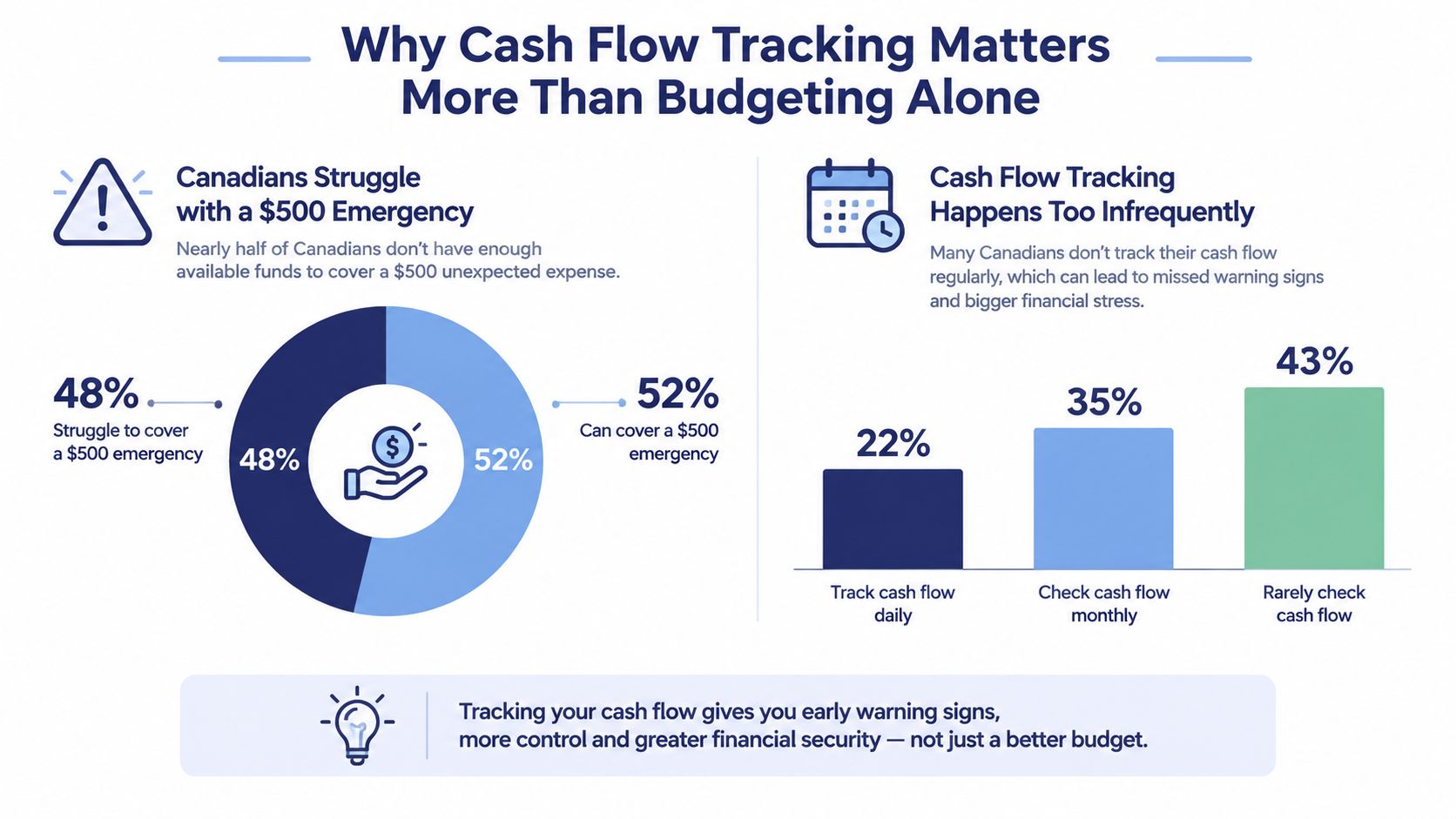
The need is widespread. In the 2019 Canadian Financial Capability Survey, 17% of Canadians said their monthly spending exceeded their income, while 27% said they borrowed to buy food or pay for daily expenses. The survey also found that 49% reported having a budget, compared with 46% in 2014. You can review these findings in the Consumer Views on Cash Flow Planning report.
Those figures don't mean budgeting is useless. They show that many people still experience a gap between money coming in and money going out, even when some budgeting habits exist. A tracker addresses that gap by putting dates beside the commitments.
Three timing problems categories can miss
A freelancer waits for client payments. The category plan may show enough expected income for the month, but it doesn't protect the days before a late payment arrives. Date-based visibility reveals whether rent and food spending occur before that income.
A salaried worker faces a mid-cycle repair. The monthly budget may have room for car maintenance, but the account can still be short before payday. The tracker places the repair on its actual date and shows the temporary reduction in available funds.
A household coordinates separate paydays. Two incomes can cover the month's obligations while still arriving at awkward times. A running balance shows which account handles each bill and whether the household needs to move money before a payment clears.
The remedy isn't always stricter categories. Sometimes the missing information is when the money moves.
How to Build a Tracker Step by Step
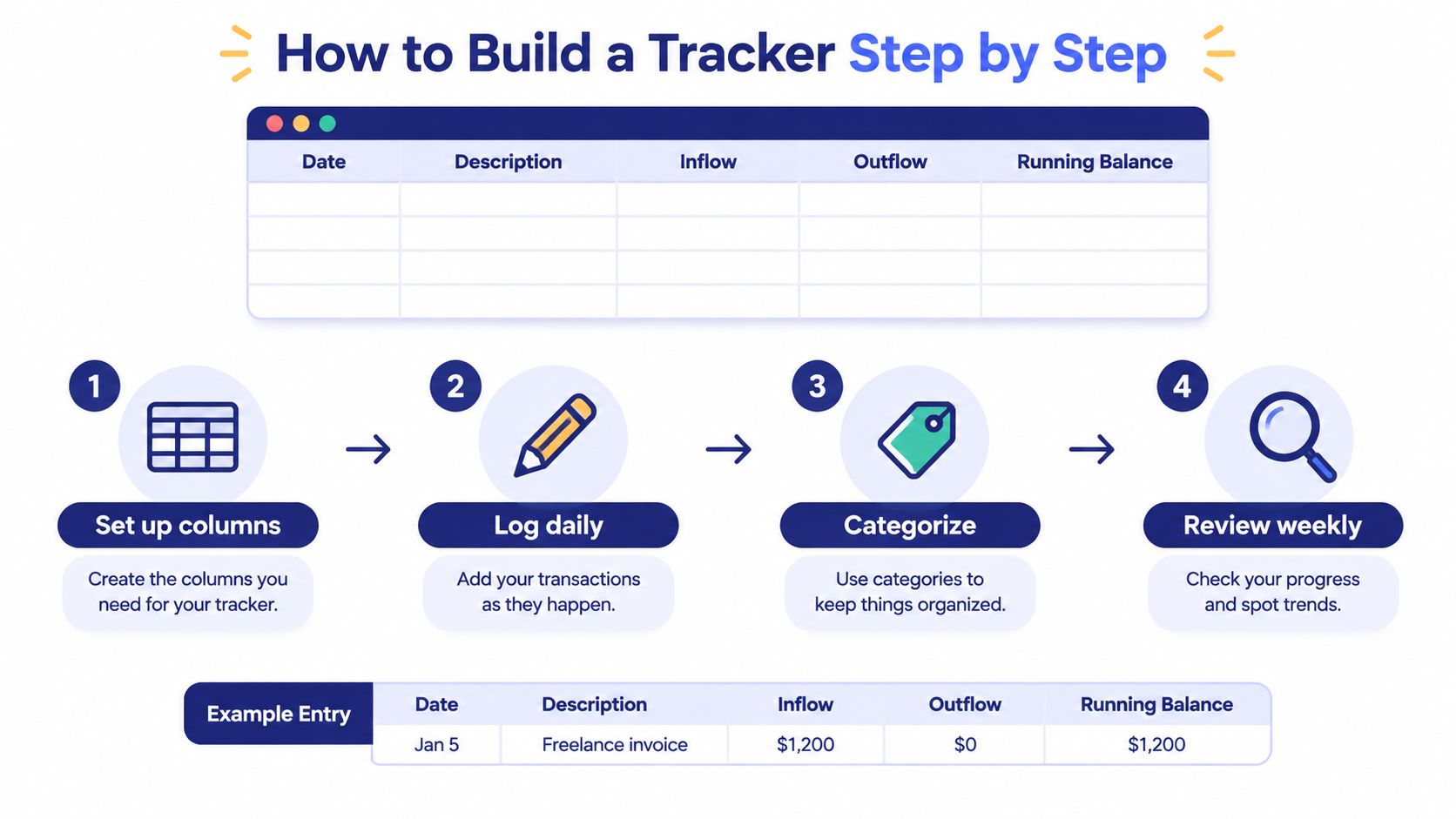
Start with the smallest system you'll use. A notebook page or blank spreadsheet is enough for the first pass. Create five columns:
- Date: When the transaction happened or is expected to happen.
- Description: A plain note such as “freelance invoice” or “electricity.”
- Inflow: Money entering the account or tracking period.
- Outflow: Money leaving it.
- Running balance: What remains after the entry.
Enter transactions consistently, including small cash purchases. Record transfers between your own accounts too, but identify them as transfers rather than treating them as new income or spending. That distinction keeps your overall picture from becoming inflated.
Add recurring items
Create a second sheet or list for predictable items such as rent, subscriptions, scheduled income, insurance, and regular debt payments. The CFPB cash flow budget worksheet is built around carrying balances from week to week, which is especially useful when income doesn't follow a calendar-month pattern.
Project recurring items far enough to expose the next meaningful pinch point. You don't need to predict every purchase. Begin with commitments that are fixed, scheduled, or difficult to postpone.
Layer in digital assistance
Once manual tracking feels understandable, add features according to the problem they solve:
- Manual entry builds awareness. You see each transaction and learn which dates matter.
- Recurring items reduce repeated work. Scheduled bills and income appear in the forward view.
- Safe-to-spend calculations answer the daily question. They subtract upcoming commitments from available funds across the remaining period.
- Account aggregation reduces reconciliation effort. You can compare cash, checking, savings, and credit in one place when that visibility suits you.
Test the setup through one complete pay cycle before redesigning it. A system that looks elegant but takes too long to update won't last. The right tracker makes the next decision clearer without requiring a finance degree.
Choosing Between Spreadsheets and Apps
A spreadsheet and an app can both track dates, inflows, outflows, and balances. The difference is how much control, convenience, and data sharing you're willing to trade.
| Factor | Spreadsheet | Manual App, such as Ledgerly | Bank-Linked App |
|---|---|---|---|
| Privacy | Data can remain on your device or chosen storage | Records stay on the device unless you switch on backup | Requires sharing account access with a third party |
| Effort | You maintain entries and formulas | You enter transactions, while the app handles structure | Imports reduce entry work |
| Visibility | Depends on your design | Focused views can show plans and available spending | Broad account snapshots may be available |
| Flexibility | Highly customizable | Uses predefined workflows | Depends on supported institutions and connections |
| Main risk | Broken formulas or inconsistent updates | Abandoned manual entry | Sync errors or unwanted data exposure |
When a spreadsheet fits
Choose a spreadsheet if you want complete control over columns, formulas, and storage. It works well for someone comfortable maintaining a running balance and checking formulas when the layout changes. The trade-off is that you must remember to open it, enter transactions, and correct mistakes yourself.
When an app fits
A manual mobile app can provide faster entry and built-in handling for recurring items, account moves, and daily spending calculations without requiring bank credentials. Ledgerly is one example of this approach. It uses manual entry, optional recurring transactions, on-device storage with backup off until you switch it on, multiple account types, transfers treated as moves, and CSV export. That makes it a reference point for a privacy-first workflow, not a replacement for choosing the method that matches your habits.
Bank-linked tools offer less manual work and a wider automatic view, but they involve account connections and depend on the reliability of those connections. If privacy and explicit control matter most, use a spreadsheet or manual app. If convenience outweighs data-sharing concerns, a linked service may feel more practical. For another perspective on the trade-offs, see whether budgeting apps are worth it.
A Worked Example for Irregular Income
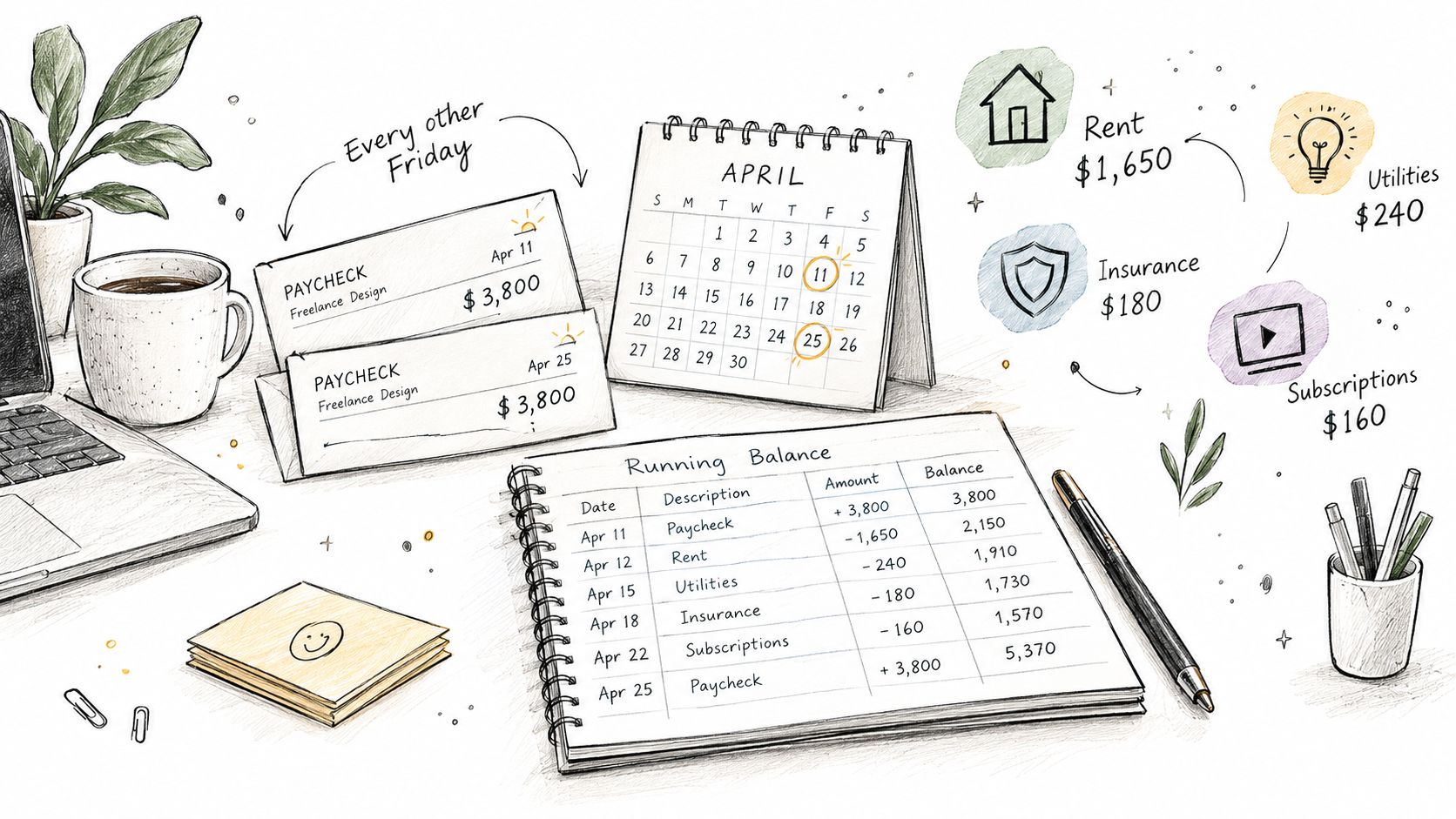
Consider a freelance designer who receives $3,800 every other Friday. Fixed monthly outflows include $1,650 in rent, $240 in utilities, $180 in insurance, and $160 in subscriptions. The cycle begins with $420 left after a previous transfer.
On payday, the $3,800 deposit arrives. Rent withdraws the same day, taking $1,650 from the account. The utility payment is scheduled for day six, so the tracker reserves that amount before showing discretionary capacity.
The first calculation looks like this:
- Opening balance: $420
- Deposit: +$3,800
- Rent: -$1,650
- Utility payment reserved: -$240
- Remaining amount before other spending: $2,330
A $300 transfer to savings on day two must appear in the cash flow view as money leaving checking and arriving in savings. It isn't income and it isn't a household expense. If your tracker combines accounts, the total money picture stays accurate while the checking balance reflects the move.
Reading the daily allowance
After reserving known obligations and the savings transfer, the designer's planned spending capacity is roughly $155 per day across the remaining period. That isn't a promise that the money will be spent evenly. It's a ceiling that helps answer whether a purchase fits before the next deposit.
Mid-cycle, an unexpected $420 invoice clears. The bank balance still looks substantial, but the forecast changes. The daily ceiling falls to about $120 until the next payment arrives.
This is why total income can mislead irregular earners. The issue isn't whether the designer earns enough across a broad period. The issue is whether money arrives before each commitment. The guide to budgeting with irregular income can help you adapt the same date-based thinking to less predictable pay.
Common Mistakes That Break a Tracker Early
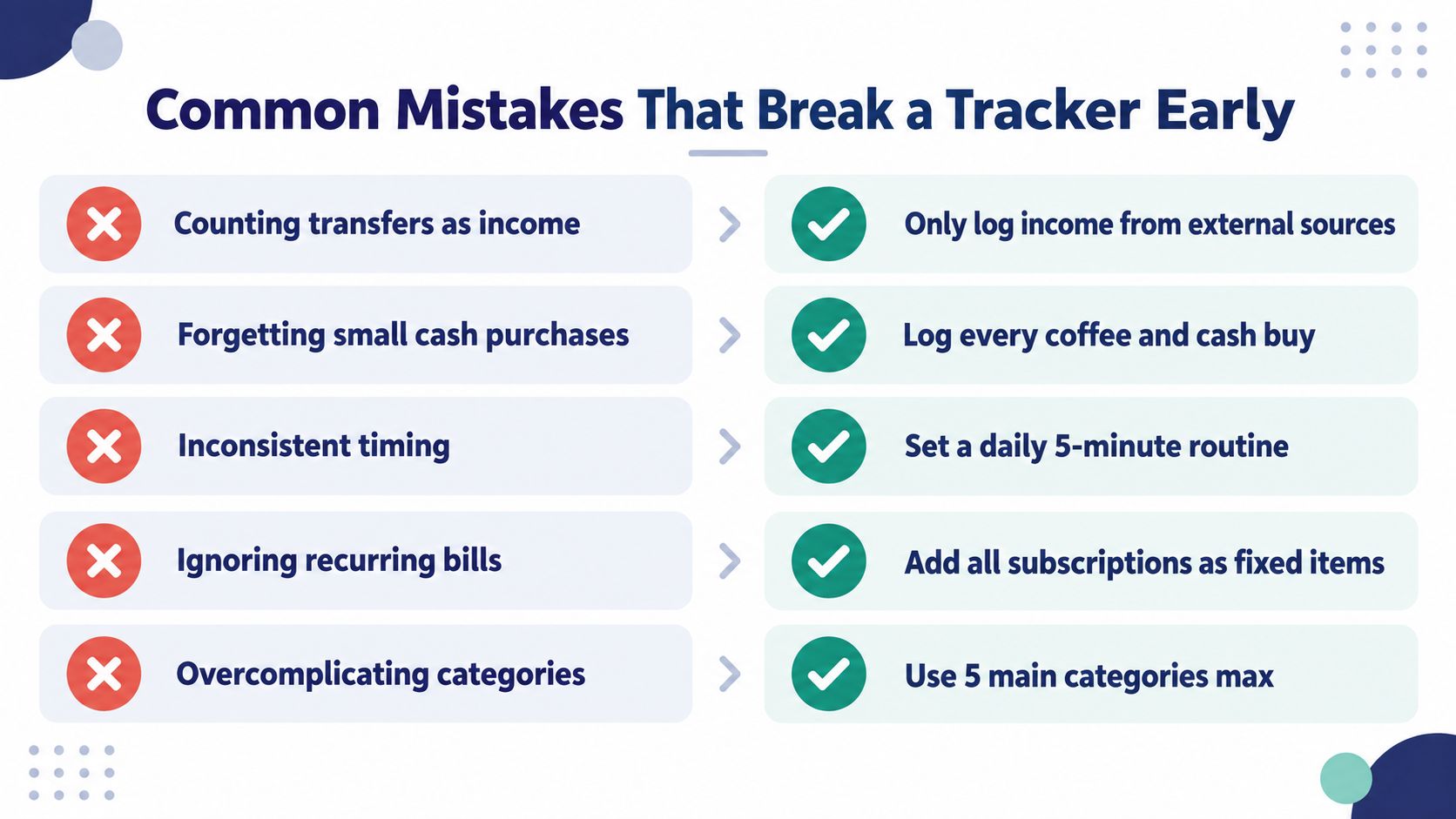
Most abandoned trackers don't fail because the owner can't understand a formula. They fail because a small accounting mistake makes the balance unreliable, or because the routine becomes too demanding. Treat the first version as a working experiment, not a test of personal discipline.
Counting internal transfers as income: Moving money from savings to checking changes location, not total household income. Log the movement between accounts and exclude it from income totals.
Forgetting small cash purchases: A coffee, tip, or cash purchase can disappear from memory quickly. Record it immediately, or keep a simple note until you update the tracker.
Using inconsistent dates: A payment recorded on the purchase date and another recorded on the settlement date can distort the forecast. Choose a consistent rule that matches when money leaves the account.
Ignoring recurring bills: Subscriptions and less frequent charges can surprise a tracker if they're absent from the forward list. Add every known recurring commitment and review the list periodically.
Overcomplicating categories: Too many labels create extra decisions without improving timing visibility. Begin with broad categories and add detail only when it changes a spending decision.
Make review part of the system
Entry and review are different jobs. Entry captures what happened. Review checks whether the recorded balance matches reality and whether upcoming dates still look correct.
Set aside a short weekly session to reconcile accounts, confirm scheduled payments, and update expected income. If a credit card payment is involved, record the purchase according to your chosen method and make sure the eventual payment isn't counted twice. The practical details of this process are covered in tracking credit card payments.
A tracker becomes useful when you trust its numbers. Accuracy comes from small corrections made regularly, not from building a perfect template on the first attempt.
Getting Started and Making It Stick
A cash flow tracker starts paying off when it helps you make a decision before money leaves. You don't need months of history before that can happen. As soon as you record upcoming bills and expected income, you can spot a timing problem that a current balance hides.
Questions beginners usually ask
How should I track unpredictable income?
Use conservative expected dates and update them when payment becomes more certain. Keep confirmed income separate from hoped-for income, and avoid assigning money to discretionary spending until you know when it will arrive.
Should I connect my bank accounts?
Only if the convenience is worth the privacy and reliability trade-offs for you. A manual tracker avoids bank logins and can keep records on-device, but it requires consistent entry. A connected tool reduces manual work while introducing dependence on third-party access and synchronization.
How much detail do I need?
Start with dates, descriptions, inflows, outflows, and balances. Add categories after the timing picture works. Categorization is helpful for reviewing habits, but the first job is knowing what you can safely spend before the next obligation.
Your first two-week routine
Open a notebook or blank spreadsheet today. For the next two weeks, log every inflow and outflow without trying to create a budget. Include transfers, cash purchases, bills, and expected payments, then compare the running balance with your actual accounts during a weekly review.
After fourteen days, look for three things: which payments were easy to forget, which income dates shifted, and where your balance became tighter than expected. Use those observations to adjust the tracker, not to criticize yourself. A reliable cash flow tracker is a timing instrument first and a category budget second, and a modest system you maintain will serve you better than a complicated one you avoid.
Ledgerly offers manual transaction entry, recurring items, account-aware transfers, and a “safe to spend today” view while keeping records on the device, unless you switch on backup, and without bank connections. If a privacy-first mobile cash flow tracker fits your routine, visit Ledgerly and try building your next pay-cycle view there.