August 24, 2026
Are Budgeting Apps Worth It? Honest Pros, Cons
Are budgeting apps worth it? We weigh automation vs privacy, convenience vs control, and when a manual, local-first app like Ledgerly makes more sense.
budgeting appsare budgeting apps worth itmanual budgetingprivacy budget appexpense tracker
Most advice about budgeting apps starts from the wrong assumption. It treats automation as an automatic win, as if linking every account and watching a dashboard means you've solved money management. In practice, the question is simpler and harder, will you keep using the app after the novelty fades, and will that use change your decisions instead of just logging them?
That matters because budgeting apps sit at the intersection of behavior, privacy, and habit. A tool can be accurate, polished, and packed with integrations, yet still fail if it pushes you into reactive checking, hides mistakes behind auto-categorization, or makes you uneasy about who can see your financial data. The best app is rarely the one with the longest feature list. It's the one you'll still trust, open, and maintain when your attention drops.
Table of Contents
- Why the Question Is Harder Than It Looks
- What the Research Says About Budgeting Apps
- Automation Versus Privacy and Control
- When Budget Visibility Helps and When It Backfires
- How to Decide If a Budgeting App Fits Your Life
- Where a Local Manual App Like Ledgerly Shines
- The Honest Verdict on Budgeting Apps
Why the Question Is Harder Than It Looks
The usual app comparison starts with a shallow checklist. Bank sync, category rules, alerts, net worth, export, done. That framework misses the bigger issue, because budgeting only helps when the tool fits the way you behave, not the way the product demo assumes you behave.
There's also a hidden cost in handing everything to automation. When an app fills in categories and totals for you, you can end up feeling informed without becoming more aware. The app records spending, but you don't always slow down enough to notice patterns, and that can make the software feel more useful than it really is.
The trade-off most reviews skip
Budgeting apps also concentrate risk. If you connect multiple accounts, you're not just buying convenience, you're expanding the amount of sensitive data sitting behind one login and one provider's security practices. If the company changes pricing, changes terms, or disappears, you're left untangling a financial history that may be harder to move than the marketing makes it sound.
That's why “are budgeting apps worth it” is really a question about persistence. A system you maintain for months beats a smarter system you abandon after a few weeks. The best setup is the one that keeps you engaged without making you resent the process.
Practical rule: if a budgeting app makes you check balances more often but not spend more deliberately, it's adding friction without adding value.
What the Research Says About Budgeting Apps
The evidence is more useful than the app store blurbs. A U.K. survey of 2,000 adults found that 38% of people who monitor their spending use budgeting apps, and among app users nearly 80% open them at least weekly, with 50% using them weekly and 29.9% daily. The same survey found app users associated budgeting apps with an average annual saving of £241, compared with £220 for self-created spreadsheets. That points to a real behavior shift, not just prettier charts. Express survey on budgeting apps and savings
The harder question is why some apps help and others stall. A functionality review of 45 top-rated budgeting apps drawn from 1,335 apps on Google Play and Apple's App Store found that all supported transaction tracking, but about one third did not support envelope-style budgeting. In practice, that means a lot of tools are good at showing spending after the fact, but weaker at helping people direct money before it disappears. Functionality review of budgeting apps
Manual input still has a behavioral edge
Manual tracking changes the process because it makes you confront each purchase while it is still fresh. Research on expense tracking found that manual recording supports self-regulation, since accurate categorization and consistent entry create feedback that can reduce discretionary spending and create more budget slack. The value here is not just cleaner records. It is the extra moment of awareness. Expense tracking and self-regulation study
That also explains why app comparisons can be misleading. People who download budgeting apps may already care more about money than the average person, so the apps can look more effective than they would in a random group. The better question is whether the app fits your habits, your tolerance for upkeep, and your willingness to keep opening it when life gets messy.
| Research Finding | Automated Apps | Manual Entry Apps |
|---|---|---|
| Frequent use is common among engaged users | Strong fit when the app is opened regularly Express survey on budgeting apps and savings | Can also support regular review if the habit sticks |
| Transaction tracking is widely available | Common across major apps Functionality review of budgeting apps | Also present, but with more deliberate user input |
| Envelope-style control is uneven | Often missing or incomplete Functionality review of budgeting apps | Usually stronger because categories are set by the user |
| Behavior change depends on awareness | Can help when reviews are deliberate | Stronger feedback loop because entry itself creates reflection |
Automation Versus Privacy and Control
Bank-linked apps are convenient for a reason. They pull in transactions, summarize balances, and cut down the work of keeping a budget current. The trade-off is privacy and control, because you are giving a third party access to the financial details you likely check most closely.
Bank-linked automation
The upside is clear. Less typing, fewer missed transactions, and a live view across checking, savings, credit, and sometimes investments. For people who know they will not keep up with manual entry, that convenience can be the difference between staying organized and abandoning the system.
The hidden cost is easier to miss. Once everything is pooled into one dashboard, it is simple to treat the app as the source of truth instead of your own decisions. If the app mislabels transactions, lags on updates, or buries a transfer under a confusing category, the mistake can sit there for a while before you notice.
Manual, local-first budgeting
Manual budgeting makes the opposite choice. You do the work yourself, but you keep tighter control over what gets recorded, where it lives, and who can access it. That matters if you are privacy-conscious, if you do not want to hand over bank credentials, or if you want a record that still makes sense if the app disappears.
The price is effort. You have to enter transactions, review categories, and stay honest about spending in real time. But that effort keeps the budget tied to actual choices instead of passive aggregation. For a practical look at that workflow, this breakdown of tracking everyday expenses shows how a manual system can stay usable day to day.
The question is not whether automation works. It is whether you will still use the app when the novelty fades, the alerts get noisy, and you start caring more about control than convenience. If the answer depends on trust, ownership, or a low-friction habit you can keep, manual entry is often the safer fit.
When Budget Visibility Helps and When It Backfires
Budget visibility helps when it closes the loop between action and adjustment. Check a category, see you are close to the limit, and change the next purchase. That is real value. Dashboards, alerts, and “safe to spend” views can keep disciplined users aligned with their plan.
The same visibility can backfire. Frequent access to budget standing information can lead to higher spending, especially near the end of a budget period, when people keep checking how much room is left. The app is not misleading you. The remaining balance starts to feel like permission.
Why checking can become rationalizing
That is the trap. A category marked “budget left” stops acting like a guardrail and starts acting like a target. The question changes from “Should I buy this?” to “Can I fit this into what is left?”, and those are not the same.
Notification design matters. Too many pings create fatigue. Too much dashboard checking can also create the feeling that the budgeting work is already done, even when spending has not changed.
The users who do best with visibility treat it as a checkpoint, not a scoreboard. They check with a purpose, log the purchase, and move on. The pattern that causes trouble is reactive checking, especially when someone is anxious, bored, or trying to justify a purchase they already wanted.
Who benefits most from visibility
People with steady income and a clear spending plan often get the most from real-time views. They already know their boundaries, so the app reinforces discipline. People who are stressed, impulsive, or prone to “I've got room left” thinking may do better with less frequent checking and stricter categories.
Visibility is useful when it supports a habit you will keep. If it becomes a constant prompt to re-litigate every purchase, it can add friction without improving control.
Don't confuse awareness with restraint. An app can show you the number and still leave you free to talk yourself into the wrong purchase.
How to Decide If a Budgeting App Fits Your Life
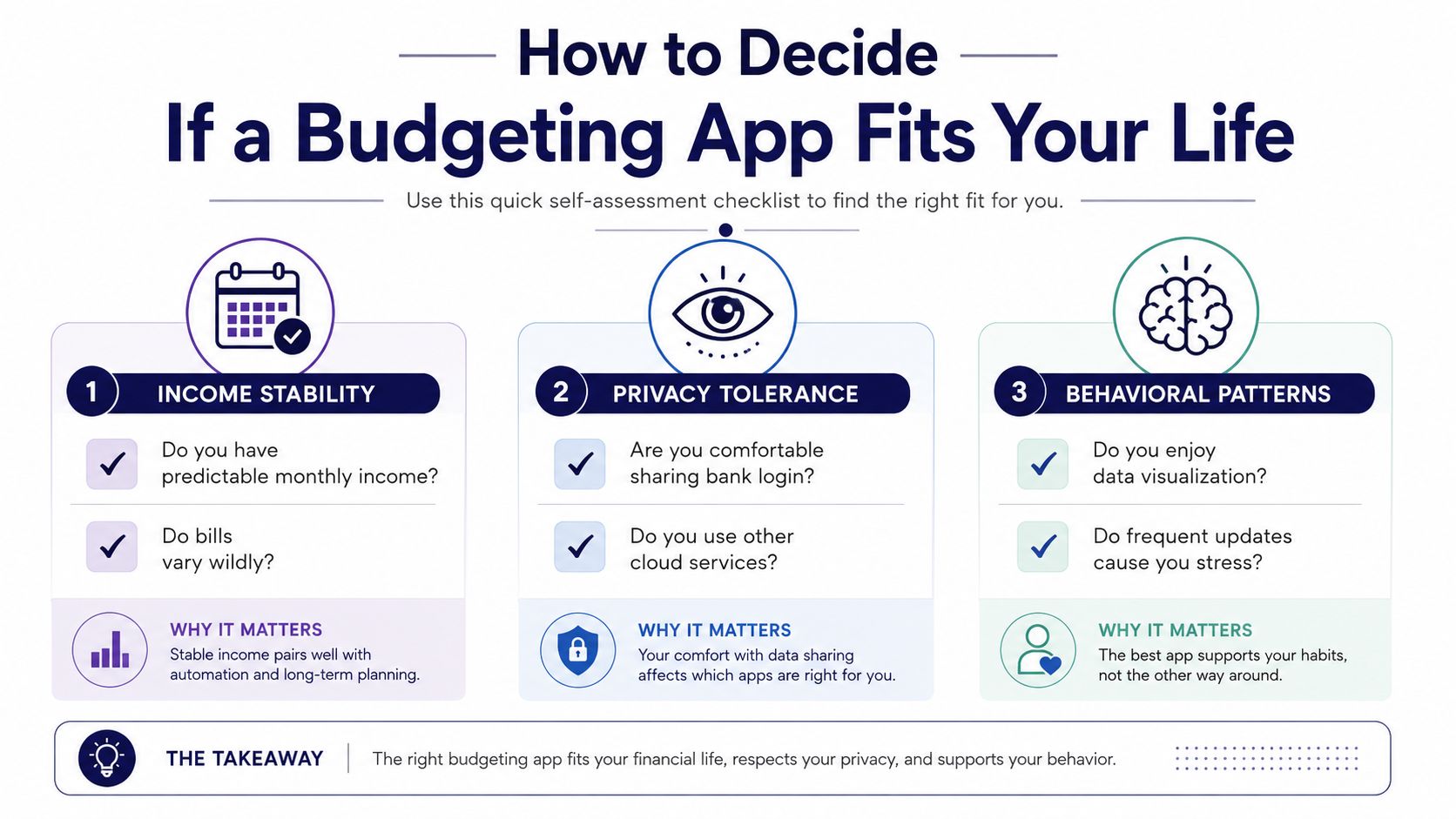
The first filter is income pattern. If your pay is predictable and your monthly obligations are stable, automation is easier to make useful. If your cash flow changes a lot from month to month, a rigid app can feel like it's constantly behind reality.
The second filter is privacy tolerance. If you're comfortable linking accounts and letting a third party aggregate your financial picture, bank-connected apps are on the table. If that makes you uneasy, manual tools or local-first options are a cleaner fit. For a useful comparison of non-connected options, this guide to budget apps without bank linking is a good place to start.
A simple self-check
Use three questions before you commit.
- Will I maintain it after the novelty wears off? If the answer feels shaky, start simpler.
- Do I want convenience more than privacy? If yes, connected apps make more sense.
- Do I need the app to change behavior, or just record it? If you need behavior change, manual review matters more than automation.
Couples should add one more question, whether the app helps both people stay honest without creating extra friction. Shared visibility can reduce arguments, but it can also become another place to negotiate every purchase.
That's why the right setup is different for each person. A stable salaried earner who wants a clean dashboard may do fine with a connected tool. A freelancer, a privacy-first user, or someone who keeps abandoning subscriptions is usually better off with a simpler system that doesn't depend on perfect app loyalty.
Where a Local Manual App Like Ledgerly Shines
A manual app earns its place when life doesn't fit neatly into a synced dashboard. Freelancers are the obvious case. If client payments arrive irregularly, and you need to move money between categories as work lands, a rigid imported feed can make more sense on paper than it does in practice.
Privacy-focused users are another clear fit. Some people don't want to hand over bank credentials to a budgeting platform, even if the app promises convenience. They'd rather keep the record on the device, control backups themselves, and know exactly what data exists outside their phone.
Real-world situations where manual tracking wins
Couples with shared expenses often prefer a system that forces a check-in before money disappears into a black box. Manual entry gives both people a reason to look at the same categories, the same timing, and the same trade-offs. That's useful when the goal isn't just tracking, but better conversations.
Travel is another place where manual entry stays honest. Cash purchases, multiple currencies, and small one-off expenses can fall through bank feeds or appear later than you want. If you need a complete picture, inputting the expense yourself is often more reliable than waiting for aggregation to catch up.
Ledgerly fits this kind of workflow because it keeps data on the device, uses manual transaction entry, supports recurring items, and exports records to CSV when you want a portable archive. Its structure is built around a few focused screens, so you can review what matters without digging through a dense financial dashboard. Ledgerly export to CSV explanation
The deeper advantage is psychological. Manual entry forces a pause. That pause makes each purchase feel real, which is exactly what many automated systems erase. If you've abandoned connected apps before but still want budgeting to stick, a local, manual tool often works better because it adapts to your habits instead of demanding perfect compliance.
The Honest Verdict on Budgeting Apps
Budgeting apps are worth it when they support a habit you'll keep. They're not worth much if they only give you a prettier way to ignore your spending, or if they make you more likely to check balances reactively and spend what's left. The product doesn't win just by working in theory, it wins by changing what you do next.
That leaves a pretty clear split. Bank-linked apps make sense for people with stable income, a strong preference for convenience, and enough self-control to avoid turning the dashboard into permission to spend. Manual, local-first tools make more sense for privacy-conscious users, irregular earners, and anyone who keeps abandoning automated apps after the first burst of enthusiasm.
The test is simple. Pick one method, use it consistently, and see whether your spending decisions improve. Don't measure success by how many transactions the app logged. Measure it by whether you bought fewer things you didn't need and felt more in control when money got tight.
Ledgerly is a manual budget and expense tracker that keeps your data on your device, so you can budget without linking bank accounts or sending your financial history to a server. If you want a privacy-first way to record spending, review recurring items, and export your data when you need it, visit Ledgerly and see whether a local-first budgeting workflow fits your routine.
Published via Outrank app