September 2, 2026
Budgeting App for Irregular Income That Works
Find a budgeting app for irregular income that handles pay-period customization, forecasting, and buffers. Compare features and pick the right fit in 2026.
budgeting app for irregular incomevariable income budgetfreelance budget apppay period budgetingirregular income tracker
You check your balance on a Tuesday and it looks fine. A client payment landed early, a gig payout cleared faster than expected, and last week's anxiety fades. Then the next invoice slips, rent is still fixed, and the money that felt safe three days ago has to cover the gap until the next payment shows up.
That's the point where a normal monthly budget starts lying to you. It assumes your income arrives on the first, lands in equal chunks, and behaves politely. If your pay doesn't work that way, the right budgeting app for irregular income has to do something stricter than track spending, it has to tell you what you can safely spend from actual cash received, not from hope.
| App approach | What it does well | Where it breaks |
|---|---|---|
| Traditional monthly budget apps | Easy category setup, familiar calendar view | Still leans on projected monthly income |
| Envelope and zero-based tools | Strong spending control by category | Often needs manual handling for uneven paydays |
| Forecasting tools | Good at timing, runway, and future bills | Tax reserves for personal income can be secondary |
| Income-averaging tools | Smooths feast-and-famine income into a steady allowance | Falls apart when you skip a month or take a pause |
| Plan-based apps like Ledgerly | Uses chosen pay periods and actual receipts to compute safe-to-spend capacity | Requires disciplined manual entry |
The answer isn't a prettier budget screen. It's a system that matches your pay pattern, keeps tax money separate, and shows you when cash is about to get tight. Ledgerly's own budgeting discussion makes the same basic case, manual control matters when you don't want your budget to depend on bank connections.
Table of Contents
- When a Monthly Budget Stops Working
- Three Features Every Irregular-Income Budgeting App Needs
- How Five App Approaches Handle Non-Monthly Pay Cycles
- Inside Ledgerly's Plan View for Fortnightly and Between-Paydays Budgeting
- Matching the App to Your Real Pay Pattern
- Tax Buffers, Income Floors, and Forecast Runway
- Your First 30 Days With a New Irregular-Income Budget
- Which Setup Fits Your Situation Best
When a Monthly Budget Stops Working
A freelance designer gets paid twice in one month, then once in the next, then not again for 42 days because a client drags their feet. In Month 1, the fixed budget looks generous, almost too easy. By Month 3, the designer is deciding between rent, software subscriptions, and a quarterly tax payment, and the calendar-month plan that felt tidy in the app is useless on the ground.
That's the core failure. A monthly budget assumes income arrives evenly and on schedule, but irregular earners live in gaps, delays, and lumpy receipts. The result isn't bad discipline, it's a bad model.
The evidence backs that up. A Consumer Financial Protection Bureau-linked finding, echoed in Penn State Extension guidance, says almost one-quarter of U.S. consumers report that their income changes “somewhat” or “a lot” from month to month, and people with variable income are more likely to struggle to pay a bill or expense than people with stable income. A separate 2026 Wiley study found that people in the highest quartile of income predictability were more likely to budget than those in the lowest quartile, and lower predictability was also linked to weaker use of budget categories. That's why irregular-income budgeting needs flexibility, bill timing, and cash-flow smoothing, not a fixed monthly assumption. The research note on budgeting with irregular income from Penn State Extension points in the same direction.
A monthly reset is convenient for a salary. It's not a truth serum for freelancers, contractors, or gig workers.
The promise here is simple. You should be able to judge a budgeting app for irregular income by whether it computes a safe-to-spend number from cash received, then compare the main app approaches side by side, and finally see how a plan view can handle fortnightly and between-paydays setups without bank linking. Once you stop pretending every month starts clean, the feature criteria become obvious.
Three Features Every Irregular-Income Budgeting App Needs
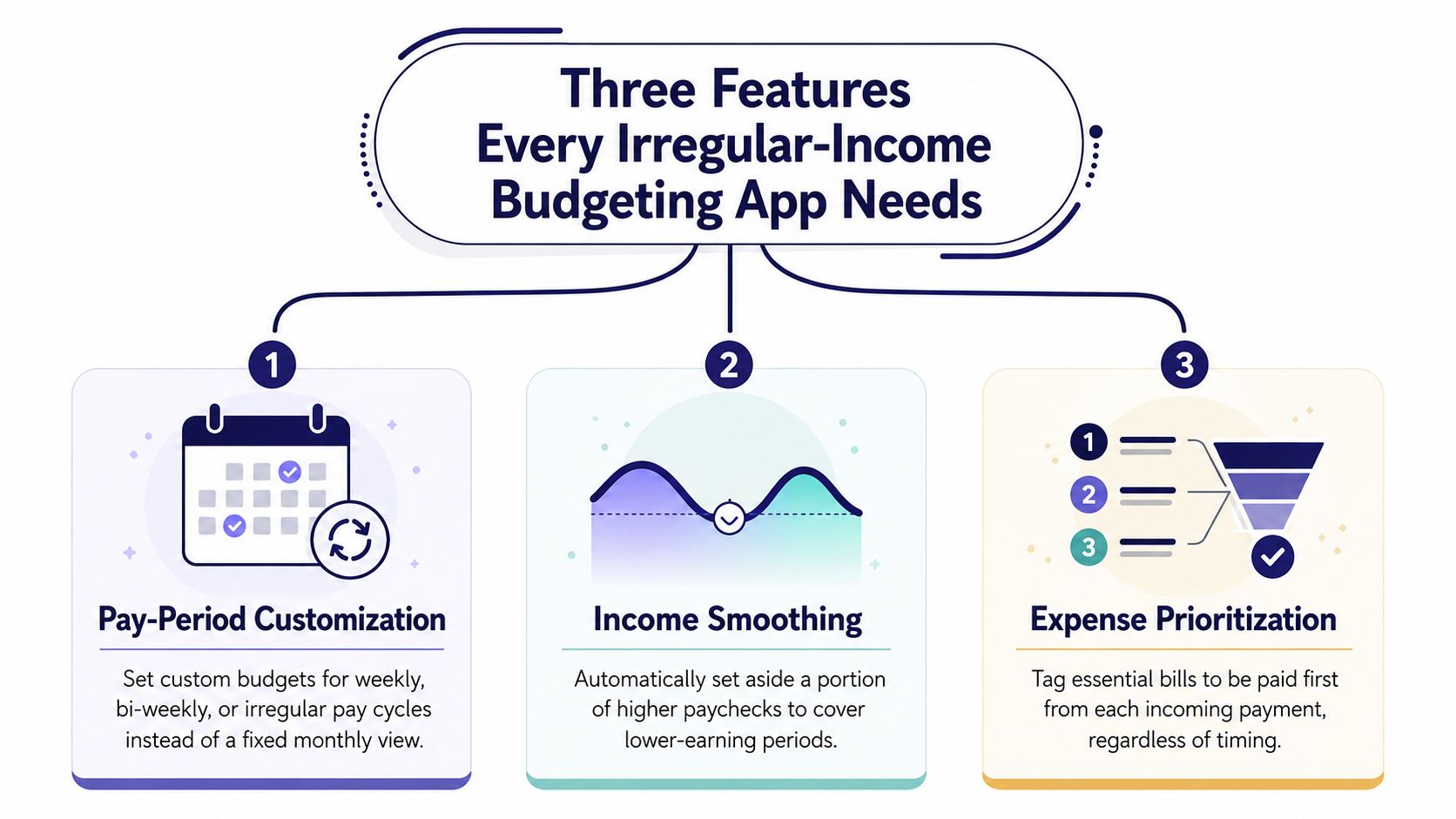
Pay-period customization
If the app only works on a monthly reset, it's already wrong for irregular income. A real system has to let you budget by the period that matches your work pattern, whether that's every two weeks, a 28-day cycle, or a between-paydays window tied to specific receipt dates.
That matters because the unit of control changes. A teacher paid once a month and a courier paid on different days need different planning frames. The app should let you say, “These are the dates that matter,” instead of forcing every inflow into a generic month.
Cash-based forecasting
A safe-to-spend number should come from money received, not projected salary or an annualized average. If the app counts income you expect but haven't collected, it will make you spend against cash that doesn't exist yet.
That's the difference between a toy and a tool. PocketGuard's irregular-income guidance recommends setting an income floor and tracking against what came in, while routing payments through a holding account before moving a baseline amount into operating cash. That logic is conservative by design, and that's exactly what irregular earners need. PocketGuard's irregular-income method makes the point clearly.
If the number on screen assumes tomorrow's invoice will arrive on time, it isn't a safe-to-spend number. It's a guess.
Buffer handling
Irregular income needs a buffer because timing is the enemy, not just overspending. That means the app should give you a place for tax reserves, an income floor that sets a conservative baseline, and a runway indicator that shows how long your current cash can last.
The most useful apps don't treat those as extras. They make the buffer visible so you can see whether a good week is money you can use, or money that needs to sit still until a slow period hits. The interface should encourage restraint when receipts are lumpy, not reward false confidence.
Ledgerly's daily spending guidance fits that mindset because it pushes the user to think in terms of available cash, not just category labels. That's the right evaluation framework for the comparison below.
How Five App Approaches Handle Non-Monthly Pay Cycles
The category matters less than the trade-off. Some apps are good at categories but weak on timing. Others are strong on runway but clumsy about personal tax reserves. If you're living on uneven income, you need to know which weakness you can tolerate.
| App Category | Pay-Period Customization | Cash-Based Forecasting | Buffer & Tax Reserve Handling |
|---|---|---|---|
| Traditional monthly-budget apps | Usually limited to a custom start date | Often still centered on projected monthly income | Basic category savings, weak tax handling |
| Zero-based envelope tools | Strong category control, manual period workarounds | Can work if you re-enter income carefully | Good for allocations, but buffers are often user-managed |
| Cash-flow forecasting apps | Strong timing and runway views | Usually good at forward visibility | Personal tax logic may be shallow |
| Income-averaging apps | Smooths income into a fixed allowance | Uses smoothing, not true receipt-by-receipt control | Helpful for stability, less precise when income stops |
| Plan-based apps like Ledgerly | Built around monthly, fortnightly, or between-paydays periods | Computes safe-to-spend from recorded receipts | Explicit buffer and tax-reserve handling |
Traditional monthly tools are the easiest place to start, but they still think in calendar logic. That makes them comfortable and often misleading. Zero-based envelope systems do better when you want every dollar assigned, but they can turn into a manual wrestling match if your paydays don't line up with your billing cycle.
Forecasting apps aimed at business owners are a stronger fit when timing is the core problem, because they surface cash-flow gaps before you hit them. The catch is that personal tax planning often gets pushed to the side, even though irregular-income workers usually need to carve out tax money from every payment.
Income-averaging tools can be calming because they smooth volatility into a steady allowance. I'd use that only if your income swings are temporary and you don't mind the risk of false stability during a month off. For everyone else, plan-based tools are cleaner, because they let the period match the pay pattern instead of forcing the pay pattern to behave.
Inside Ledgerly's Plan View for Fortnightly and Between-Paydays Budgeting
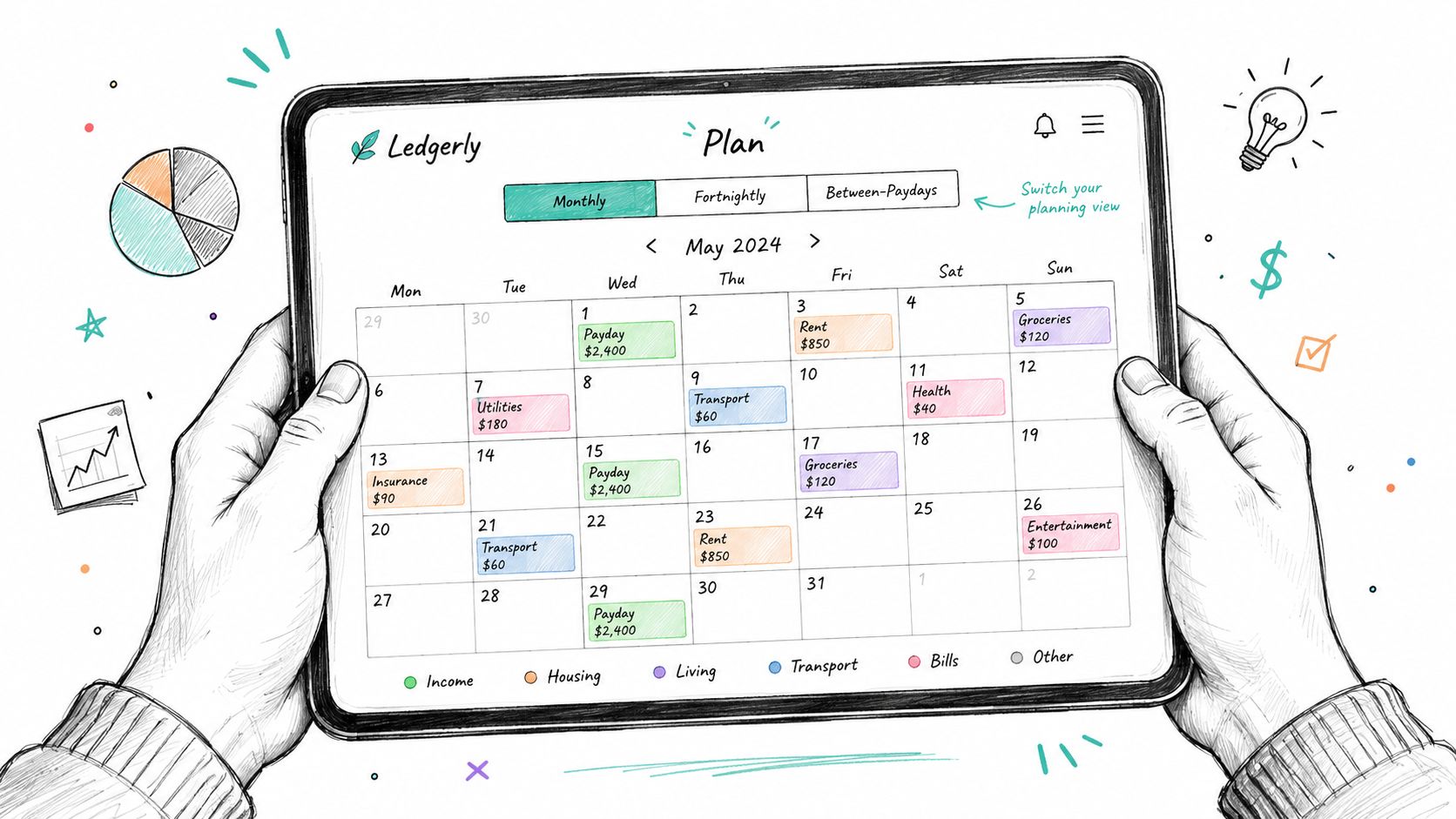
Ledgerly takes the direct route. It doesn't link to a bank, so every figure comes from manual entry, and that means the cash-on-hand total is the number driving the whole plan. For irregular income, that's cleaner than any imported balance because you control what counts as received, what counts as a transfer, and what gets held back.
The Plan view starts with the period you choose. Monthly works for ordinary bills, but fortnightly and between-paydays are the useful settings when money lands in blocks. Instead of pretending the month is one smooth container, Ledgerly splits the view into pay blocks tied to real receipt dates.
How the safe-to-spend number gets built
The logic is simple and strict. You enter income that has arrived, subtract committed bills and savings transfers, then divide what remains by the days left in the block. That gives you a daily spending capacity instead of a vague monthly allowance.
This is the piece most apps get wrong. They show you category progress without answering the one question that matters at 9 a.m., how much can I spend today without causing a problem next week?
Why the between-paydays view matters
Between-paydays mode is the sharper fit for lumpy invoices or short funding gaps. You anchor the window to a specific pay date, then the app surfaces one safe-to-spend figure rather than a category-by-category illusion of control. That's useful when you've got rent, food, a tax bucket, and a few variable bills that all need to be protected before you touch discretionary spending.
Buffer envelopes, tax reserves, and forecast runway sit in the same view, so you're not bouncing between screens to decide whether cash is available. The point isn't to make budgeting prettier. It's to make the next spending decision honest.
Matching the App to Your Real Pay Pattern
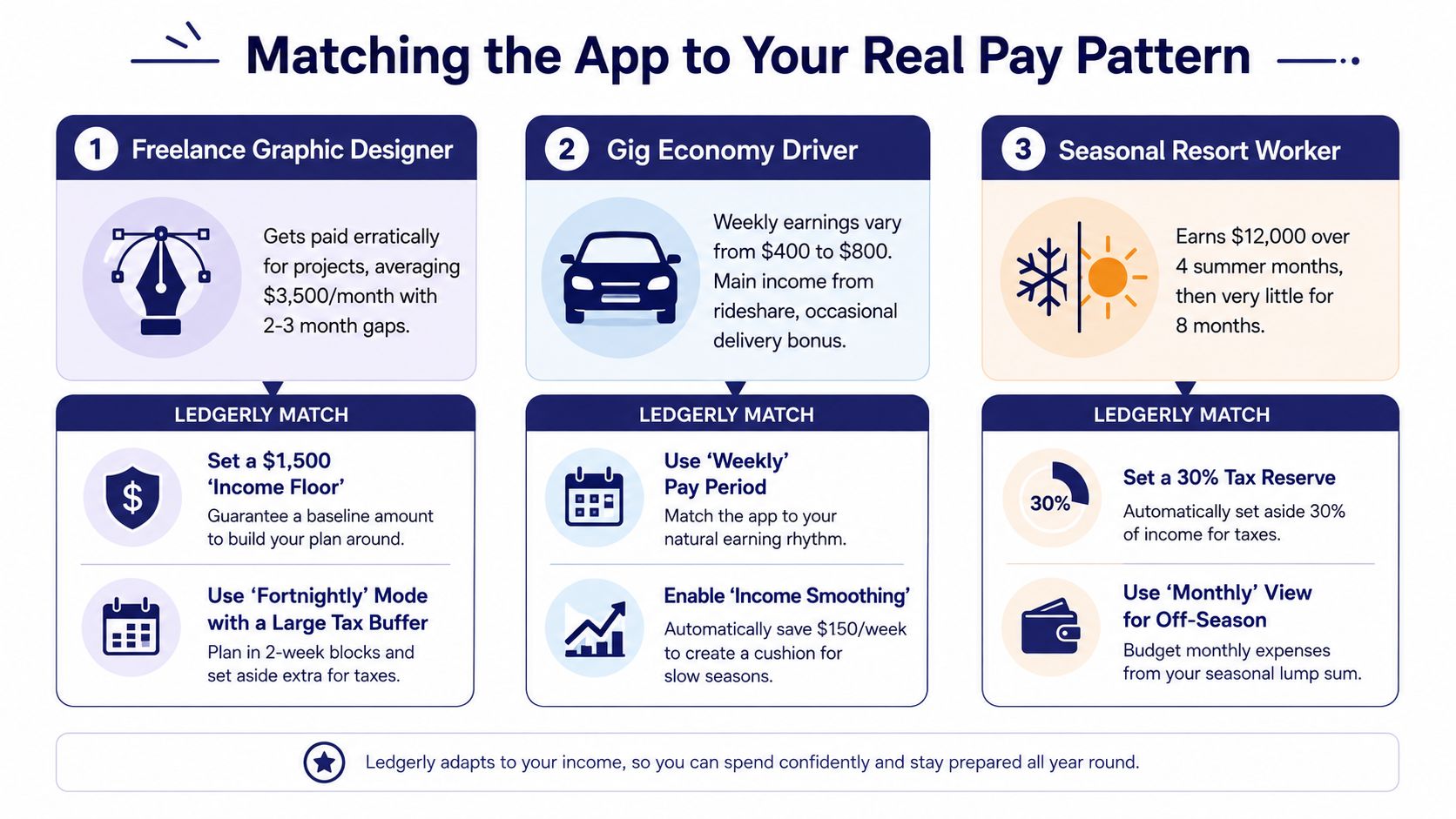
A freelance designer with invoices that land 30 to 45 days after project completion needs a between-paydays setup. Each invoice should act like its own short budget window, because that's how the cash behaves. A fortnightly or monthly view hides the delay, and delay is the whole problem.
A hospital shift worker paid every second Friday can use fortnightly blocks without much friction. The schedule is regular enough that a clean two-week period makes sense, and a small buffer can absorb an extra shift or a slightly smaller check without breaking the plan. That's a better fit than forcing a monthly rollup and then guessing where the money should go.
A gig driver working across platforms with daily deposits has a different issue. The average looks okay until one slow week knocks the balance lower than expected, so the app needs a conservative baseline and a wider buffer to smooth the low end. The right setup isn't the one with the most categories, it's the one that keeps you from overspending on your strongest day.
A matching rule I use with clients is blunt, if the income rhythm is predictable, use a period that mirrors it. If the income is lumpy, use a window that forces restraint.
FortuneTell and Finlitera's forecasting guidance points to the same operational idea, but the setup still has to fit the person. A budgeting app for irregular income wins when it aligns with the way cash lands, not the way a calendar looks.
Tax Buffers, Income Floors, and Forecast Runway
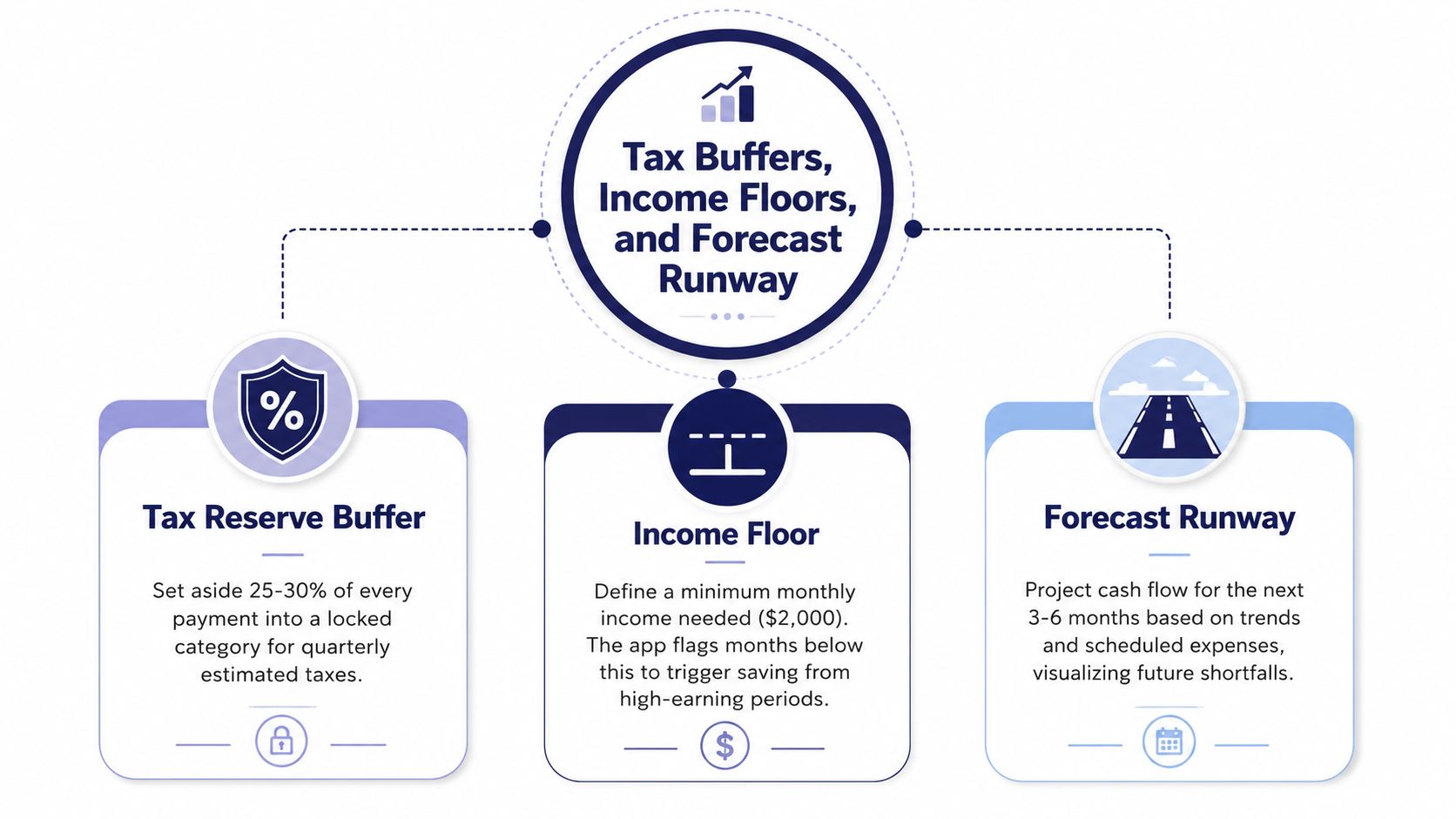
Tax reserve buffer
Tax money has to leave the spendable pool the moment income arrives. Variable-income workers often need reserves for income tax, self-employment tax, VAT or GST, and delayed assessments, so a generic savings bucket is too soft. A dedicated tax reserve makes the decision automatic.
That matters even more when cash flow is already unstable. Gig-economy research reports that 68% of surveyed workers lack emergency savings and 54% struggle with monthly expenses, which means tax shortfalls and cash shocks are likely tangled together rather than separate problems. The study on the financial realities of freelancers and platform workers makes that conflict hard to ignore. The gig-economy financial realities study is a useful reality check.
Income floor
An income floor is the number I'd rather see in an app than an optimistic average. It's the lowest net amount you can safely count on in a pay period, and the app should use that floor for daily capacity instead of a flattering estimate.
That's the right way to force discipline. If your recent months vary, the floor keeps you from budgeting off the high end and then getting trapped when receipts slow down. The floor is not pessimism, it's protection.
Forecast runway
Runway tells you how long the current cash position can support committed spending. It should project forward across the next pay periods and flag the point where planned outflows overtake expected inflows.
Use all three controls when the pay pattern is uneven, tax obligations are separate, or bills arrive before invoices get paid. If your tax reserve routinely pushes past a quarter of each payment, the set-aside logic needs a review. That's the moment to stop treating the tax buffer as a suggestion and treat it as a rule.
Your First 30 Days With a New Irregular-Income Budget
Days 1 to 3 are for raw data. Pull in the last 90 days of transactions, mark every inflow, and tag which dates were real pay, refunds, or transfers. If you skip this cleanup, the app will make sense of noise, and noise is exactly what breaks irregular-income planning.
Days 4 to 7 are for the conservative baseline. Set the income floor lower than your lowest recent month so the buffer mechanism gets exercised immediately, not later when you've already spent too much. That feels strict at first, and that's the point.
Weeks 2 and 3 are about behavior, not redesign. Check the safe-to-spend figure each morning, record expenses within 48 hours, and review the forecast runway once a week. If you wait until the end of the month to look, you're just documenting the failure after it happened.
By Day 30, compare the baseline with reality and ask one hard question, does this pay-period setup match the way money lands for me? If it doesn't, change the period before you change your discipline. The setup has to fit the cash pattern, or you'll keep fighting the tool. Ledgerly's irregular-income setup guide follows the same practical logic.
Which Setup Fits Your Situation Best
If you're a freelancer getting two to four lump invoices per month, use a between-paydays configuration that recomputes spending capacity from actual receipts. That's the cleanest answer when each payment is its own event and the gaps matter more than the averages.
If you're a shift worker with weekly pay, a standard weekly period in a tool like YNAB or Monarch fits better. You don't need fancy smoothing if your pay rhythm is already stable, you need consistency and quick category checks.
If you're juggling DoorDash, Uber, and Upwork at once, use a multi-stream forecasting tool like Lunch Money that consolidates platform payouts into one cash view. That's better when the problem is scattered income sources, not just irregular timing.
| Income Pattern | Best Configuration | Why It Fits |
|---|---|---|
| Lump invoices and long gaps | Between-paydays mode | Treats each receipt as its own spending window |
| Stable weekly wages | Weekly budget period | Matches the pay cycle without extra complexity |
| Multiple platforms and mixed deposits | Multi-stream forecasting tool | Consolidates scattered inflows into one view |
Before you choose, answer four questions. Do your payments arrive in predictable chunks or variable amounts? Do you need to self-fund taxes? Are you willing to link bank accounts, or do you want manual control? Do you need a safe-to-spend number today, or just category tracking?
Pick the pattern that matches your reality, then commit to the 30-day workflow above. That's the fastest way to stop guessing and start managing cash like it's uneven on purpose, because it is.
Ledgerly gives you a manual, on-device way to handle irregular income without bank linking, and that matters if you want the budget to reflect what you've received. If you're trying to build a safe-to-spend system around fortnightly or between-paydays planning, visit Ledgerly and see how its Plan view fits that workflow.