By Team @ Ledgerly
Best budgeting apps in 2026: 10 personal budget apps compared
Ten personal budget apps compared on automation, privacy, price and effort, with picks for beginners and for people who never link a bank.
Updated October 18, 2026
personal budget appbudgeting appsprivacy-first budgetingmanual budgetingexpense tracking
The best personal budget app isn't the one with the longest feature list. It's the one whose compromises you can live with after the novelty wears off. Automatic bank imports save time, but they require connectivity and trust. Manual entry gives you control, but it asks you to participate. Cloud dashboards make collaboration easier, while local storage limits exposure but can narrow access. Envelope budgeting creates discipline, while forecasting tools help you see what's coming. Free access lowers the barrier, but paid products often support deeper planning and cleaner interfaces.
This comparison judges each option by how it works after setup, including ongoing effort, privacy model, automation, household use, pricing considerations, and hard limitations. The choice is less about finding an app that can record spending and more about deciding what you're willing to trade to keep using it.
Ledgerly is the relevant alternative for people who want deliberate entry, offline access, and no bank connection. It won't automate your financial life, and that's precisely why it deserves a place in this list.
Table of Contents
- 1. Ledgerly
- 2. You Need A Budget
- 3. EveryDollar
- 4. Quicken Simplifi
- 5. Monarch Money
- 6. Copilot Money
- 7. Goodbudget
- 8. Tiller
- 9. PocketGuard
- 10. Honeydue
- Top 10 Personal Budget Apps: Feature Comparison
- If you are new to budgeting
- Choose the Trade-Off You Can Maintain
1. Ledgerly
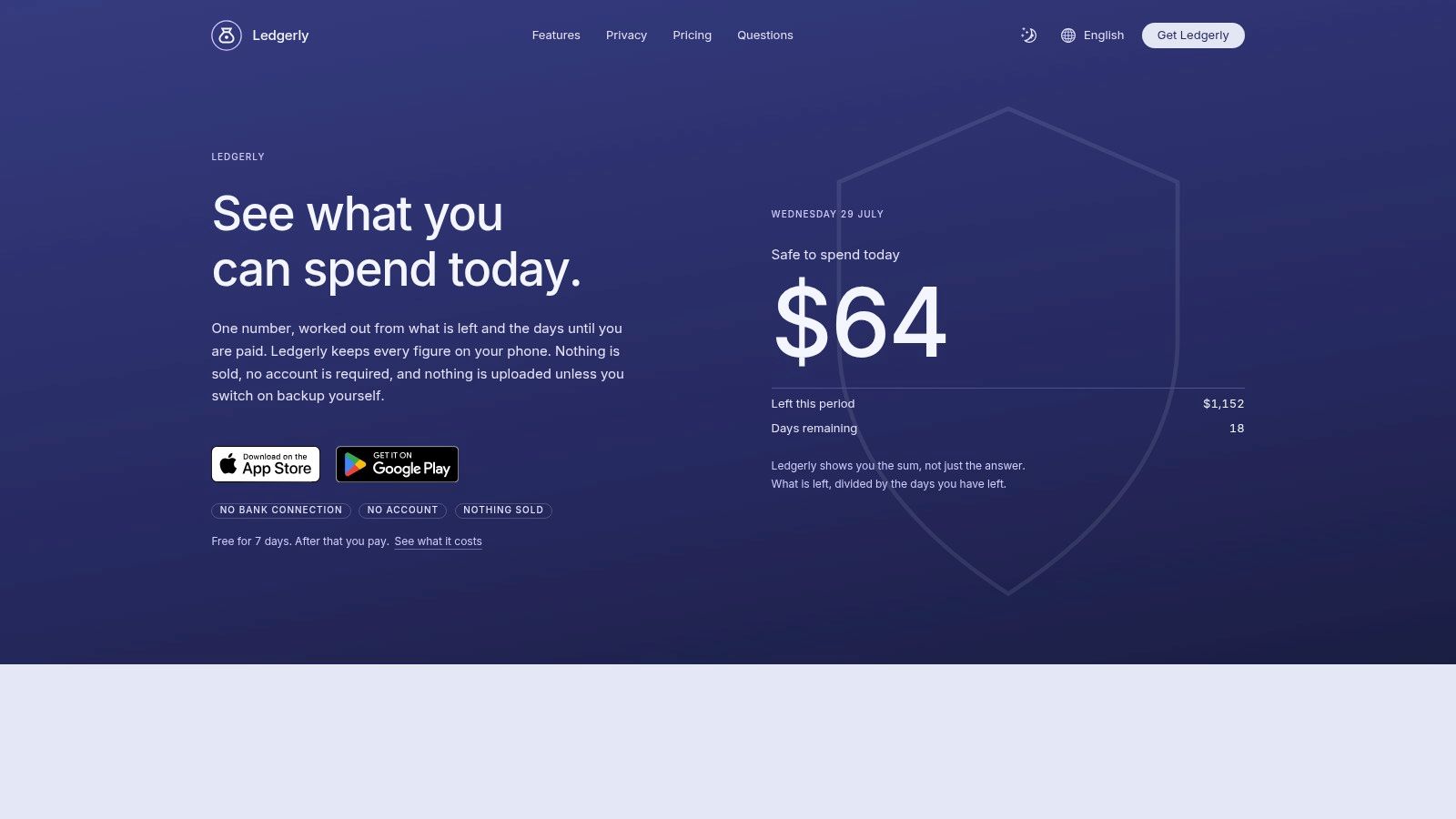
Ledgerly asks you to trade automation for privacy and deliberate control. It's a mobile budget and expense tracker for iOS and Android that keeps financial records on your phone unless you switch on backup, and works offline. You enter the amount, category, and account yourself, then the app updates totals immediately. Recurring salary, rent, and subscription items appear under Upcoming, so manual tracking doesn't have to mean rebuilding the same transactions every pay cycle.
The most useful daily feature is the “safe to spend today” view. Ledgerly calculates that figure from remaining funds, upcoming items, and the days left in the budgeting period. That's more actionable than a dashboard that merely tells you what you've already spent. Plan supports monthly, fortnightly, or between-payday periods, which matters for irregular income. You can also keep household finances and side projects in separate budgets.
The privacy trade-off
Ledgerly doesn't connect to banks, automatically import transactions, or store transaction records on a server. Your records leave the device only if you switch on backup to Google Drive, iCloud, or a local file. App lock supports a passcode and device biometrics. Crash reports go to Sentry, and amounts are filtered out of them before they are sent.
That local-first design avoids shared bank credentials and automatic category mistakes, but it creates a clear obligation. You must enter transactions consistently. Skipped days are the usual reason a manual budget fails, so the routine has to be short.
Ledgerly keeps that workflow shallow with four screens, Today, Plan, Money, and Tools. Transfers move between accounts rather than becoming false expenses, balance corrections use one adjustment line, and CSV export keeps your records portable. The app supports 165 currencies and five interface languages, but it doesn't offer built-in financial coaching, AI categorization, or cross-currency conversion.
A single paid tier is offered monthly, yearly, or as a lifetime purchase, and it is free to start. Without a purchase, users can still read, search, export, and back up existing data, but adding new transactions requires a purchase. Pricing varies by country through the App Store and Google Play.
Practical rule: Choose Ledgerly only if manual entry feels like a reasonable routine, not a punishment you hope automation will eventually remove.
Best for: Privacy-conscious users, irregular-income earners, offline mobile use, and people who want every category and account decision under their control.
Website: Ledgerly
2. You Need A Budget
YNAB makes the opposite compromise from Ledgerly. It trades some simplicity for a strong zero-based budgeting method, built around assigning available money to specific jobs. That envelope-style discipline is powerful when your main problem isn't seeing transactions, but deciding what each dollar should do before you spend it.
The app is especially effective for users who want structure around goals, debt payoff, and household planning. Its category targets can turn vague intentions into planned amounts, while debt tools and a loan calculator add a more deliberate payoff workflow. The educational material is also a meaningful part of the product. YNAB doesn't show charts. It teaches a budgeting method and expects you to apply it.
Household sharing supports up to six people through one subscription, with web, iOS, and Android access and real-time synchronization. That makes it a stronger fit for a family or couple that wants one shared system than a local-only app designed around one device.
The trade-off is cost and complexity. YNAB is more expensive than many lighter budgeting tools, and its method can feel demanding if you only want a spending ledger. Direct import is available for selected banks, while other users may need manual CSV workflows. Multi-currency budgeting isn't supported within a single plan, which can matter for people managing finances across countries.
Read this [guide to the best budgeting app] if you're deciding whether a strict planning method or a more flexible tracker suits your habits.
Best for: Users who want envelope discipline, goal targeting, debt planning, and strong household sharing.
Website: YNAB
3. EveryDollar
EveryDollar keeps zero-based budgeting more approachable. Its manual-entry web version gives beginners a straightforward way to plan income and expenses without immediately committing to bank connections or a complex financial dashboard. You create categories, allocate income, and record spending against the plan. The appeal is clarity rather than analytical depth.
The free manual workflow is the important distinction. It lets someone test whether they'll maintain a budget before paying for automation. Premium adds bank connections, reports, paycheck planning, and a Financial Roadmap, so the product can grow from basic entry into a more assisted system.
A useful paycheck workflow
EveryDollar works best when your income arrives in a predictable pattern and you want to plan around paychecks rather than build a detailed long-term model. The Premium Paycheck Planner can help organize incoming money against upcoming categories, but users who need unusual budget periods or extensive account structures may find the controls limited.
The biggest limitation is availability. Premium and mobile functionality are U.S.-only, which narrows its usefulness for international users. Even within its main market, the app is less suitable for power users who want detailed customization, advanced forecasting, or a broad net-worth view.
EveryDollar is a practical starting point for someone who finds budgeting software intimidating. It won't satisfy everyone, and its paid layer adds a recurring commitment, but the free manual version creates a low-risk way to learn the workflow. For readers comparing tools around payday planning, this paycheck budget app guide adds useful context.
Best for: Beginners who want simple zero-based entry, especially U.S. users planning around regular paychecks.
Website: EveryDollar
4. Quicken Simplifi
Simplifi is built for people who want their budget to look forward. Its Spending Plan combines current activity with projected balances, bills, and expected income, so the central question becomes, “What will my cash position look like?” rather than only, “Where did my money go?”
That makes it a better fit than a strict envelope app for users who manage several recurring obligations and want a broad household view. Bill and subscription tracking helps keep upcoming charges visible, while goals and savings watchlists add direction without forcing every dollar into a rigid category before the month begins. Investment views extend the app beyond day-to-day budgeting.
Simplifi also puts emphasis on bank connectivity and support. That convenience lowers the effort of keeping records current, but it introduces the standard cloud-linked trade-off. You're trusting account aggregation, imports, and categorization to remain reliable, and you'll still need to review transactions when merchants or transfers are interpreted incorrectly.
Web and mobile feature parity makes the product easier to use across devices. Household sharing supports collaborative access, although users looking for intensive envelope discipline may find the system too flexible. It's designed to help you understand cash flow, not to enforce a detailed allocation philosophy.
Pricing deserves attention before subscribing. Simplifi commonly promotes discounted first-year offers, with renewals at then-current rates. Check the renewal terms rather than treating the introductory price as the long-term cost.
Best for: Users who want projected cash flow, bill visibility, bank connectivity, and a modern web-and-mobile experience.
Website: Quicken Simplifi
5. Monarch Money
Monarch Money asks you to pay for breadth and collaboration. It combines category and group-based budgets with a cash-flow timeline, goals, investments, and net-worth tracking. That makes it less of a narrow spending tool and more of a shared financial command center.
The household workflow is its strongest practical advantage. People can assign transactions, review activity, and work from shared financial information without forcing every conversation into a single-person account. For couples managing separate and joint spending, that distinction matters. A budget that shows everything but gives nobody responsibility can become another neglected dashboard. Monarch's assignment and review features give the shared system more operational structure.
Its design is clean and its policy is straightforward. Monarch presents itself as ad-free and says it doesn't sell financial data. That doesn't remove the broader considerations of cloud storage and linked accounts, but it gives privacy-conscious households a clearer position to evaluate than an app that depends on advertising or opaque data monetization.
The compromise is premium pricing. Pricing tiers and promotional discounts can be confusing, so compare the ongoing rate rather than focusing only on an introductory offer. Monarch also provides more visibility than enforcement. Users who want every available dollar assigned through a strict envelope method may prefer YNAB or Goodbudget.
Monarch makes sense when collaboration and long-term visibility matter more than minimalist manual control. It's especially useful for households that want budgets, investments, goals, and net worth in one coordinated environment.
Best for: Couples and households that need shared workflows plus broad financial tracking.
Website: Monarch Money
6. Copilot Money
Copilot Money prioritizes polish, speed, and assisted categorization. It's Apple-centric, with support for iOS, iPadOS, macOS, and the web, and it adds investment and real-estate tracking to ordinary spending views. The product is aimed at users who want their financial software to feel refined rather than utilitarian.
AI-assisted categorization reduces the repetitive work that makes connected budgeting apps frustrating. You'll still review and correct entries, but the intended workflow is approval and adjustment rather than entering every purchase from scratch. That's convenient for people with multiple accounts and a high volume of transactions. It's also less transparent than choosing every category manually, because the system's usefulness depends on how well its suggestions match your financial rules.
Copilot emphasizes an ad-free experience and says it doesn't sell financial data. Bank connections are limited to U.S. institutions, which is a significant boundary for international users. The app is paid-only after its trial, with no permanent free plan, so you're paying for the interface and automation rather than using it as an indefinite free tracker.
Where the compromise appears
Copilot offers fewer envelope-style controls than specialist budgeting apps. It's better at showing patterns, categorizing activity, and presenting a broad financial picture than enforcing a strict spending allocation. Users who want a detailed plan for every category may find the experience too observational.
The Apple focus is a strength for people who live across Apple devices, but it's a poor fit for mixed-platform households that need equal support everywhere. Copilot works best when the user values a fast review habit, polished presentation, and automated organization more than local-only storage or manual certainty.
Best for: Apple-focused users who want AI-assisted categorization, investments, and a polished connected experience.
Website: Copilot Money
7. Goodbudget
Goodbudget is a digital envelope system first and a financial dashboard second. You create envelopes for spending categories, allocate money before purchases happen, and manually record transactions against those envelopes. That structure suits people who want a visible limit for groceries, transport, entertainment, or other variable spending without needing a complex forecast.
The manual workflow is a feature, not an accident. It forces a user to acknowledge spending and decide which envelope should absorb it. Couples and families can share budgets across devices, which makes Goodbudget more collaborative than a single-device manual tracker while preserving the discipline of pre-planned categories.
Premium adds unlimited categories and envelopes, removes account and envelope limits, and enables bank synchronization in the U.S. That creates a straightforward decision. Stay manual if you value awareness and control, or pay for automation if repeated entry is undermining consistency.
Goodbudget's interface is simpler and less analytics-heavy than premium financial suites. You won't get the same breadth of investment views, net-worth analysis, or cash-flow projections. That restraint can help families who need a shared spending plan without turning budgeting into a data-management project.
The app is a good middle ground between Ledgerly's local-first control and cloud-based household tools. It doesn't eliminate the privacy questions that come with syncing, but its manual mode lets you keep the central budgeting habit without linking every account.
Best for: Couples, families, and manual-budget users who want classic envelope discipline with cross-device sharing.
Website: Goodbudget
8. Tiller
Tiller is for people who don't want a budgeting app to decide what their system should look like. It feeds bank transactions and balances into private Google Sheets or Microsoft Excel workbooks, giving you a spreadsheet as the operating environment. You can use the Foundation templates, adapt community templates, or build a structure that matches your own categories and reporting habits.
That flexibility is the main reason to choose it. Rules can automate categorization, Direct Fills provide daily updates, and the underlying files remain in your spreadsheet ecosystem. If you cancel, you can keep the data already stored in those workbooks. For users who understand spreadsheets, that's a stronger form of portability than a closed dashboard.
The trade-off is obvious during setup. Tiller requires comfort with formulas, templates, workbook organization, and troubleshooting. It isn't the right recommendation for someone who wants a calm mobile experience with one clear daily number. It's a toolkit for people willing to maintain their own financial model.
Privacy is also a matter of where you're comfortable storing information. Tiller's spreadsheet-first approach gives you control over the files, but bank feeds still rely on aggregation services such as Plaid and Yodlee. Google Sheets and Excel introduce their own account-security responsibilities, so “my spreadsheet” doesn't mean “no external exposure.”
Advanced automations can also differ between Sheets and Excel. Choose the platform you already use confidently, then test the templates before rebuilding your entire budget around them.
Best for: Spreadsheet users who want maximum customization, bank feeds, rules, and durable access to their records.
Website: Tiller
9. PocketGuard
PocketGuard reduces budgeting to a question anyone can answer immediately: what's safe to spend after bills, goals, and obligations are accounted for? Its “In My Pocket” calculation is the centerpiece, supported by bill tracking, subscription management, debt planning, goals, custom categories, and transaction rules.
This is a different compromise from YNAB. PocketGuard doesn't ask you to build the most rigorous envelope system. It tries to turn a connected financial picture into a practical spending boundary. That makes it useful for users who find detailed category allocation exhausting but still want a guardrail between today's available cash and upcoming commitments.
The experience depends heavily on aggregator reliability. If a bank connection fails, a balance lags, or a transaction imports incorrectly, the safe-to-spend figure needs review before you trust it. Automation saves time only when the underlying data remains current and correctly interpreted.
PocketGuard emphasizes no ads and no selling of user data, but it remains a connected service rather than a local-only ledger. Users need to compare that privacy model with their own comfort level. The ecosystem is smaller than the largest incumbents, which may affect how many institutions, support paths, or integrations work smoothly for a particular household.
Pricing includes options such as a lifetime plan, which can appeal to users who dislike indefinite subscriptions. Evaluate the product by whether its safe-to-spend view changes your daily decisions, not by how many secondary tools appear in the menu.
Best for: People who want one clear spending number, bill tracking, and forward-looking guidance without strict envelope management.
Website: PocketGuard
10. Honeydue
Honeydue is designed around coordination between two people. It gives couples shared visibility into accounts, budgets, and bills while allowing them to choose what they share. Transaction categorization, notifications, and in-app chat keep financial discussion close to the activity that prompted it.
That focus changes the definition of a successful budget. A solo user may want detailed forecasting, investment allocation, and net-worth reporting. A couple may first need to know whether a bill is covered, who is handling it, and whether a purchase needs discussion. Honeydue puts communication and selective visibility ahead of advanced analysis.
The core app is free, with optional tips supporting development rather than a conventional paywall for the basic experience. Optional joint card and bill-pay features are available for some users. That makes Honeydue an approachable choice for couples who need shared awareness but aren't ready to pay for a premium financial suite.
Its limitations follow from that narrow purpose. Forecasting and analytics are less developed than in Monarch Money or Quicken Simplifi, and the feature set is geared toward two-person coordination rather than solo financial planning. Couples who need detailed envelope controls may prefer Goodbudget, while households seeking a complete net-worth and investment dashboard may outgrow Honeydue.
The app works best when both partners agree on what should be shared and how notifications should be handled. Technology can make transactions visible, but it can't replace an agreement about responsibilities, spending boundaries, or regular money conversations.
Best for: Couples who need shared bills, selective account visibility, messaging, and a free core workflow.
Website: Honeydue
Top 10 Personal Budget Apps: Feature Comparison
| App | Core Features ✨ | UX & character | Price & Value 💰 | Target Audience 👥 | Unique Selling Points ✨ |
|---|---|---|---|---|---|
| Ledgerly | Offline, manual entry, recurring, Today/Plan/Money/Tools, CSV & backups | private, focused | 💰 Single tier: free to start, then monthly/annual/lifetime | 👥 Privacy-conscious, manual trackers, irregular income | ✨ On‑device by default, with backup the only thing that copies data off; no bank links; “safe to spend” Today view; neutral UI |
| YNAB | Zero‑based budgeting, targets, debt tools, real‑time sync | method-first, educational | 💰 Subscription (premium-priced) | 👥 Users wanting envelope/zero‑based method & education | ✨ Best‑in‑class methodology & teaching; strong household tools |
| EveryDollar | Zero‑based flow, manual free web, Premium adds imports & planner | beginner‑friendly | 💰 Free web; Premium (US only) for bank sync | 👥 Beginners, Ramsey followers, paycheck planners | ✨ Paycheck Planner & Financial Roadmap (Premium) |
| Quicken Simplifi | Cash‑flow projections, bills/subscriptions, goals, sharing | forward‑looking | 💰 Subscription (promos common) | 👥 Users wanting bank connectivity & projections | ✨ Clear projected balances & subscription tracking |
| Monarch Money | Budgets, net‑worth, goals, shared household workflows | clean, collaborative | 💰 Premium‑priced subscriptions | 👥 Households, long‑term planners | ✨ Strong shared budgeting + net‑worth planning |
| Copilot Money | AI auto‑categorization, investments, real‑estate views | polished Apple UX | 💰 Paid after trial; no permanent free plan | 👥 Apple ecosystem users; those wanting AI help | ✨ Fast AI categorization; investment & real‑estate tracking |
| Goodbudget | Digital envelopes, shared budgets, debt tracking, CSV | simple, reliable | 💰 Low annual cost; Premium removes limits | 👥 Couples/families preferring envelope method | ✨ Classic envelope-first shared budgeting |
| Tiller | Bank feeds into Sheets/Excel, templates, rules & daily fills | powerful for spreadsheets | 💰 Subscription; keeps data in your files | 👥 Spreadsheet users & customizers | ✨ Full control in your Sheets/Excel; unlimited customization |
| PocketGuard | “In My Pocket” safe‑to‑spend, bills/subscriptions, goals | actionable focus | 💰 Competitive plans incl. lifetime option | 👥 Users who want a simple safe‑to‑spend number | ✨ Clear “safe‑to‑spend” calc + subscription management |
| Honeydue | Shared accounts, transaction chat, budgets & bill visibility | couples‑focused | 💰 Free core app; optional tips | 👥 Couples coordinating money | ✨ Truly free core experience with in‑app messaging |
If you are new to budgeting
Start with the app whose routine you can keep for a month, not the one with the most features. Three questions narrow the list.
- Will you link a bank? If not, the choice is between manual apps such as Ledgerly and Goodbudget, or a spreadsheet. If you will, Monarch, Copilot and Simplifi do the importing for you.
- Do you want a method? YNAB and EveryDollar teach one and expect you to follow it. The others leave the method to you.
- Who else needs to see it? For two people sharing one budget, pick an app built for sharing. Ledgerly keeps one budget on one phone.
Whichever you choose, give it one full pay cycle before you judge it.
Choose the Trade-Off You Can Maintain
A personal budget app succeeds when its central compromise matches your actual behavior. Don't choose automation because manual entry sounds inconvenient if you already distrust bank connections. Don't choose a local-first app because privacy sounds appealing if you know you won't record purchases. The right decision is behavioral before it's technical.
Choose Ledgerly if you want records kept on your phone unless you switch on backup, offline operation, manual control, and a focused daily spending view. It's especially suited to irregular income, non-monthly pay cycles, multiple accounts, and users who want to decide every category themselves. You'll need to accept the work of recording transactions, but you'll also avoid bank connections, server-side transaction storage, and automatic classification you may have to correct later.
Choose YNAB or Goodbudget for envelope-style discipline. YNAB offers a more developed zero-based method, goal targeting, debt tools, education, and household sharing. Goodbudget is simpler and more manual, which can be an advantage for families who want visible envelopes without a broad financial dashboard. Both make the budget a spending plan, not merely a record of past activity.
Choose Simplifi or PocketGuard for forward-looking cash flow. Simplifi suits users who want projected balances, subscriptions, bills, goals, and connected accounts in one modern system. PocketGuard is more direct, built around an actionable safe-to-spend number. Both depend on linked financial data, so the convenience comes with aggregation and privacy considerations.
Choose Monarch Money when household collaboration and broad financial visibility matter most. Its shared workflow, investments, goals, and net-worth views make it a strong fit for couples or families managing more than category spending. Choose Copilot Money if you're invested in Apple devices and want polished design, AI-assisted categorization, and investment tracking, while accepting paid access and U.S.-only bank support.
Choose Tiller if spreadsheets are where you think best. It offers the most customization and keeps your working data in Google Sheets or Excel, but you'll be responsible for templates, rules, and maintenance. Choose EveryDollar for straightforward zero-based entry, particularly if you want to begin with a free manual web workflow. Choose Honeydue if the core problem is coordinating money with a partner rather than building an advanced personal-finance system.
The wider market supports this specialization. A 2024 S&P Global survey found that 83% of U.S. internet adults had used a digital finance service app during the previous year, compared with 78% in 2021, and one-third used three or more financial apps, according to S&P Global's consumer survey summary. Users are already comfortable combining tools, so you don't need to force one app to handle every financial job.
Before paying, run a practical test. Enter real transactions, review recurring items, check how transfers are handled, and see whether the daily or monthly view answers a question you ask. Read the privacy policy and understand whether records stay local, move to a cloud service, or pass through an aggregator. Independent reporting found that 60% of 20 popular budgeting apps shared user data with third parties, nearly one-third of collected data was shared, and one in four shared financial information, as documented by this report on budgeting-app data sharing. Consumer Reports also warns that users may have limited ability to restrict sharing and monetization.
The best app is the one whose privacy model, entry method, planning philosophy, and household workflow you can maintain after the first week. Test the habit before you commit to the subscription.
Ledgerly keeps your financial records on your device unless you switch on backup, works offline, and gives you manual control over budgets, accounts, recurring items, transfers, and a clear “safe to spend today” view. If that balance of privacy and deliberate tracking fits how you want to manage money, visit Ledgerly and try its focused mobile workflow.