August 29, 2026
Net Worth Tracking App Privacy and Feature Guide
Compare net worth tracking apps by privacy, offline use, and account aggregation. See why Ledgerly's on-device design stands out for manual entry.
net worth tracking appoffline budget appmanual budget appprivacy finance appLedgerly
Most advice about a net worth tracking app starts with the wrong question. It asks how much automation you can cram into one dashboard, then treats bank connections like a virtue signal. That works if your only goal is convenience. It breaks down fast if you care about credential custody, local data, and whether you can still use the app when a server is down or you don't want to sign in.
| App | Privacy | Offline/Online | Account Aggregation | Export |
|---|---|---|---|---|
| Ledgerly | Local-first, on-device by default | Works offline after first launch | Manual entry, no bank login | CSV and backup options |
| Bank-linked aggregator | Shared with third-party infrastructure | Depends on live sync | Automatic linking across accounts | Usually exportable, but data leaves the device first |
| Open-source envelope tool | Transparent code, setup varies | Often desktop-first or mixed | Usually manual or limited sync | Strong when file-based workflows are supported |
| Spreadsheet | Full user control | Works without a connection if you keep the file | Manual by design | You own the file, if you manage it well |
The comparison above is the split. Not pretty dashboards versus ugly ones. Data ownership versus data leakage. A tracker can look polished and still force you to hand over credentials, transaction history, and balance metadata. A plainer tool can be the safer one if it keeps everything where you can govern it.
Practical rule: if a product needs bank logins to function, you're not evaluating a tracker. You're evaluating how much trust you're willing to lend its backend.
Table of Contents
- Why Most Net Worth Trackers Solve the Wrong Problem
- What a Net Worth Tracking App Actually Does
- Four Criteria That Actually Decide Which App to Trust
- Inside Ledgerly's On-Device Workflow
- Ledgerly Compared to Bank-Linked and Open-Source Alternatives
- Tracking Irregular Income and Multiple Accounts Without Double Counting
- Who Should Pick Which Net Worth Tracking App
- Privacy Questions Real Readers Ask Before Switching
Why Most Net Worth Trackers Solve the Wrong Problem
Most net worth comparisons reward the wrong thing, they rank apps by how much they can automate, not by how much control you keep. That's fine for users who want a live, linked dashboard and don't mind third-party aggregation. It's a poor fit for anyone who wants to know what stays on the device, what leaves it, and what a vendor can infer from the parts that do.
The category itself is big and still growing. One industry report estimated the global personal finance app market at $31.7 billion in 2025 and projected $38.2 billion in 2026, while a separate report valued the budgeting app market at $1.85 billion in 2025 and forecast $4.32 billion by 2034 (market estimates and projections). That growth explains the flood of feature-heavy apps. It doesn't prove they're the right shape for privacy-conscious users.
Automation is not the same as ownership
Linked-account tools are built around convenience. They make a strong promise, one total, one chart, one refreshed balance set. But that promise comes with a hidden cost, your bank credentials, read-only access patterns, and account metadata often move through someone else's system.
Manual entry changes the trust boundary. You decide when a balance changes, what note it carries, and whether that update ever leaves the phone. For a user who checks balances repeatedly, that slower workflow can be the point, not the drawback. The app becomes a record you control instead of a mirror held by a platform.
Privacy changes the decision tree
The app market's scale doesn't erase the privacy gap. Independent reporting found that 60% of 20 popular budgeting apps shared at least some user data with third parties, and one analysis noted that apps collected 9+ data points on average and requested 11 device permissions on average (privacy practices and permissions). That doesn't make every linked app unsafe. It does mean the default architecture should be questioned instead of assumed.
A net worth tracking app should answer a simple test, can you see your total without giving away more than you want to share? If the answer depends on a cloud account, the app is optimizing for vendor-side convenience first. If the answer depends on local balances, explicit exports, and optional backup, you're much closer to data ownership.
What a Net Worth Tracking App Actually Does
A net worth tracker records what you own and what you owe, then turns that into a single figure over time. In practice, that means cash, checking, savings, brokerage balances, credit cards, loans, and other assets or liabilities roll into a consolidated view. Some tools update automatically. Others rely on manual entry. The output can look similar even when the data path is completely different.
Consolidation is the promise, storage is the reality
The first question is simple, does the app give you a net total and a history line? The harder question is where the balances live, who can read them, and whether the app depends on external systems to refresh them. Those are not cosmetic differences. They determine whether the software is a private ledger or a hosted service with your financial life inside it.
A good tracker also needs clean treatment of transfers. Moving money from checking to savings is not income. Paying a credit card is not spending in the usual sense if you're just shifting liabilities. A bad app can distort the picture by double-counting those movements. A better one keeps the accounting logic explicit.
Dashboard polish can hide weak privacy posture
A sleek chart doesn't protect you if the app sends more data than you expected. The core issue is not whether the interface looks modern. It's whether the app can function without bank login reuse, third-party aggregators, or hidden telemetry that shadows your balances.
That's why the privacy posture matters more than the chart chrome. A manual-first tracker may feel less magical, but it also gives you fewer ways to leak information. And for users who value discretion, that's the actual product.
The finance-app habit is already established at scale. In 2024, global finance app installs rose 27%, sessions increased 24%, and total in-app time reached 21.4 billion hours (finance app usage data). That doesn't mean every app should chase the same behavior. It means repeated, short check-ins are normal, and net worth tools should be built for that pattern instead of pretending every user wants a single always-synced financial cockpit.
A tracker earns trust when you can explain its data flow in one sentence. If you can't tell what stays local, don't use it for sensitive balances.
Four Criteria That Actually Decide Which App to Trust
The usual feature list is too blunt. A net worth tracker lives or dies on four axes, privacy posture, offline versus online operation, aggregation method, and export fidelity. If one of those is weak, the rest matters less than vendors want you to believe.
| Criterion | Ledgerly | Bank-linked aggregator | Open-source envelope tool | Spreadsheet |
|---|---|---|---|---|
| Privacy posture | On-device by default, no bank login | Data crosses a third-party service | Often strong transparency, but setup matters | Whatever you build and store yourself |
| Offline/Online | Offline after first launch | Needs ongoing online access | Varies by implementation | Works without a connection if stored locally |
| Aggregation method | Manual, explicit entry | Automatic sync via linked accounts | Usually manual or partial sync | Manual only |
| Export fidelity | CSV and backup options | Usually available, but after aggregation | Depends on project design | Native file ownership, if maintained well |
Privacy posture decides the trust boundary
If the app can't operate without account linking, the vendor sits inside your financial workflow. That's not automatically unacceptable, but it's a real trade-off. The user has to trust both the app and the infrastructure between the app and the bank.
Manual-first designs reduce that surface area. They keep credentials out of the picture, and they make every update visible. That's why privacy-sensitive users keep gravitating toward manual entry even when it costs time.
Offline use tells you how dependent the app is
Offline support is more than a nice extra. It shows whether the product was built for local operation or for a service relationship that happens to have a mobile shell. If the app still works in airplane mode after first launch, you know the core record lives on the device.
That matters for reliability too. If the app can't show balances without a network round trip, you've made your ability to check your own finances dependent on someone else's uptime.
Aggregation and export are opposite pressures
Aggregation is about convenience now. Export fidelity is about freedom later. The more an app promises automation, the more you should ask what leaves your device and how hard it is to get it back out again.
A strong net worth tracker doesn't trap you in its format. It lets you leave with your history intact. If the export is weak, every other feature is provisional.
Inside Ledgerly's On-Device Workflow
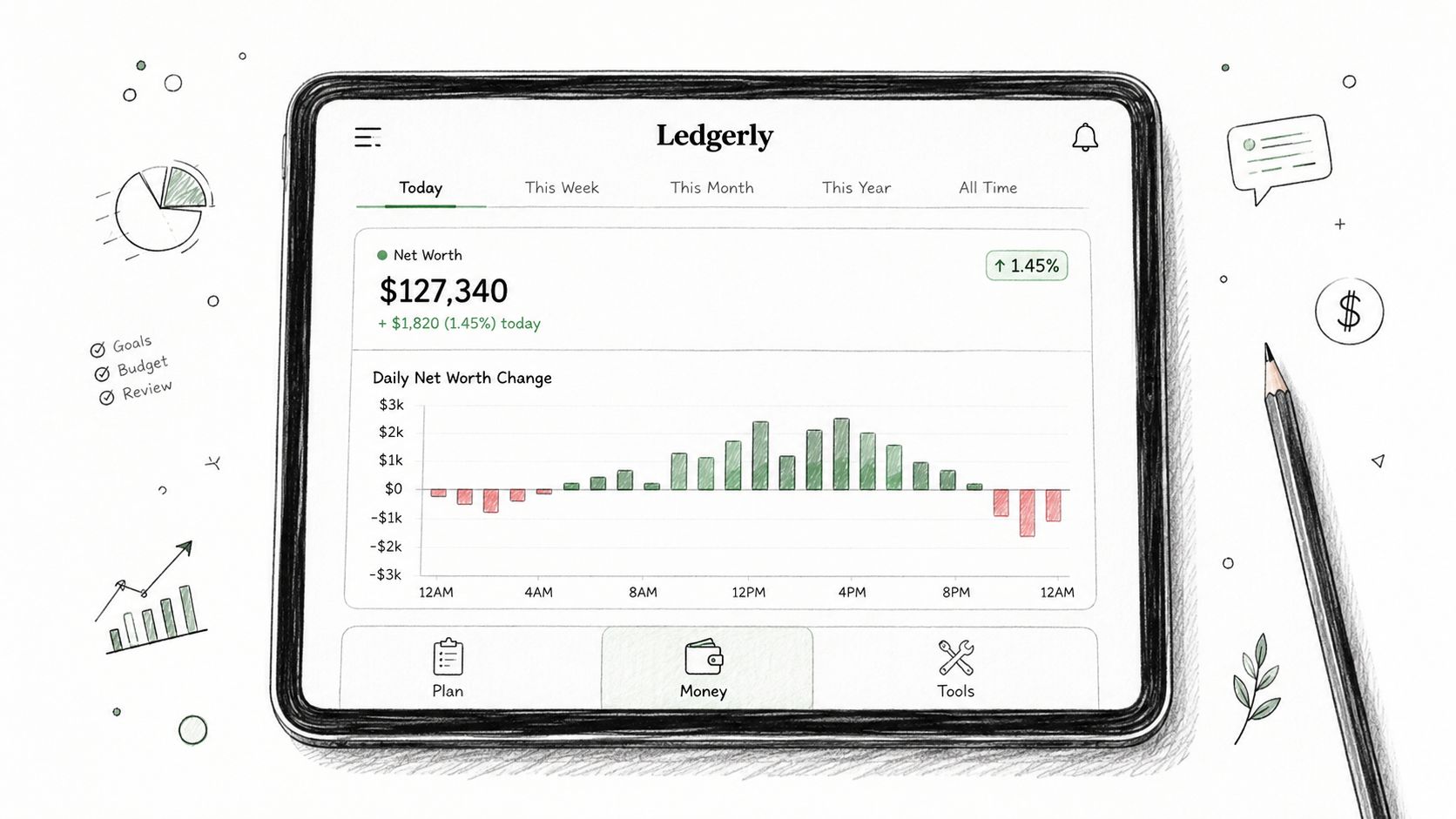
Ledgerly's workflow is built around the device, not a backend. The four tabs keep the app narrow on purpose, Today, Plan, Money, and Tools. That structure matters because it keeps a week of money management readable without turning the app into a wall of widgets.
The Today tab is the one you open when you want to know what's safe to spend. It pulls remaining funds and upcoming items into a daily view, and the app stays responsive because it's reading local data, not waiting on a network request. A checking balance can sit beside a savings balance, a brokerage cash sleeve, and a credit card without forcing the app into a giant dashboard.
The week lives in four tabs
Plan groups recurring and scheduled entries by pay cycle, which helps when income lands irregularly. Money shows the consolidated net worth view, along with asset-class breakdowns and time-based deltas drawn from the local store. Tools handles corrections, transfers between on-ledger accounts, exports, and a clear-data reset. Every one of those actions writes locally.
That's the point. A balance correction doesn't need a server to validate it. A transfer doesn't need to become an expense. A CSV export doesn't need to be negotiated through an account portal. The app can stay useful in airplane mode because it was designed to.
Operational rule: if a move between accounts changes your net worth total, the accounting model is wrong. Transfers should preserve the total, not distort it.
The app also avoids the usual dark pattern of telemetry creep. No analytics SDK is loaded, and no save-time ping is supposed to fire when you update data. That keeps the workflow plain, which is exactly what a privacy-first tracker should do. For export details, the app's CSV handling is documented in the CSV export file guide.
Ledgerly Compared to Bank-Linked and Open-Source Alternatives
The cleanest way to compare tools is by architecture, not by slogan. A bank-linked aggregator, an open-source envelope tool, and a spreadsheet each solve a different trust problem. Ledgerly sits between them, close enough to manual control that you can understand the data path, but structured enough to avoid spreadsheet sprawl.
| App | Architecture | Data Location | Aggregation | Export | Main Trade-Off |
|---|---|---|---|---|---|
| Ledgerly | Mobile-first manual tracker | On-device first | None, by design | CSV, JSON, backup | You do the entry work yourself |
| Personal Capital-style aggregator | Bank-linked dashboard | Cloud service after sync | High coverage through linked accounts | Usually available | Convenience comes with credential sharing |
| Open-source envelope tool | Community-audited software | Depends on setup | Limited or manual | Often strong | Transparency can cost polish |
| Spreadsheet | User-built ledger | Wherever you store it | None | Native file control | Total freedom, more maintenance |
The aggregator wins on coverage, then leaks at the trust boundary
A Personal Capital-style service is attractive because it covers a lot of institutions and does the linking for you. That's useful when you're tracking many accounts and frequent transactions. But the same design means your credentials, balances, and data flow depend on a third-party service, which creates outage risk and a broader attack surface.
If you need near-automatic refresh across a large set of institutions, that trade-off may be acceptable. If you don't, it's hard to justify.
The open-source tool wins on transparency
Open-source envelope tools appeal to users who want code they can inspect or at least community-audited behavior. They're often a good fit for people who care more about method than polish. The downside is that the workflow can feel desktop-heavy, and the setup burden can be real.
That means they solve trust by making the user more responsible for the system. Some people prefer that. Some don't want a finance app to feel like a maintenance project.
The spreadsheet wins on control, not speed
A spreadsheet is still the cleanest answer when you want zero vendor dependency. You own the file, you own the formulas, and you own every assumption. The problem is operational, not philosophical. Mobile entry is slower, and error recovery is on you.
Ledgerly is the middle path for people who want manual control without turning net worth tracking into a file-management exercise. It keeps the record local while reducing the friction that often makes spreadsheets fall apart.
Tracking Irregular Income and Multiple Accounts Without Double Counting
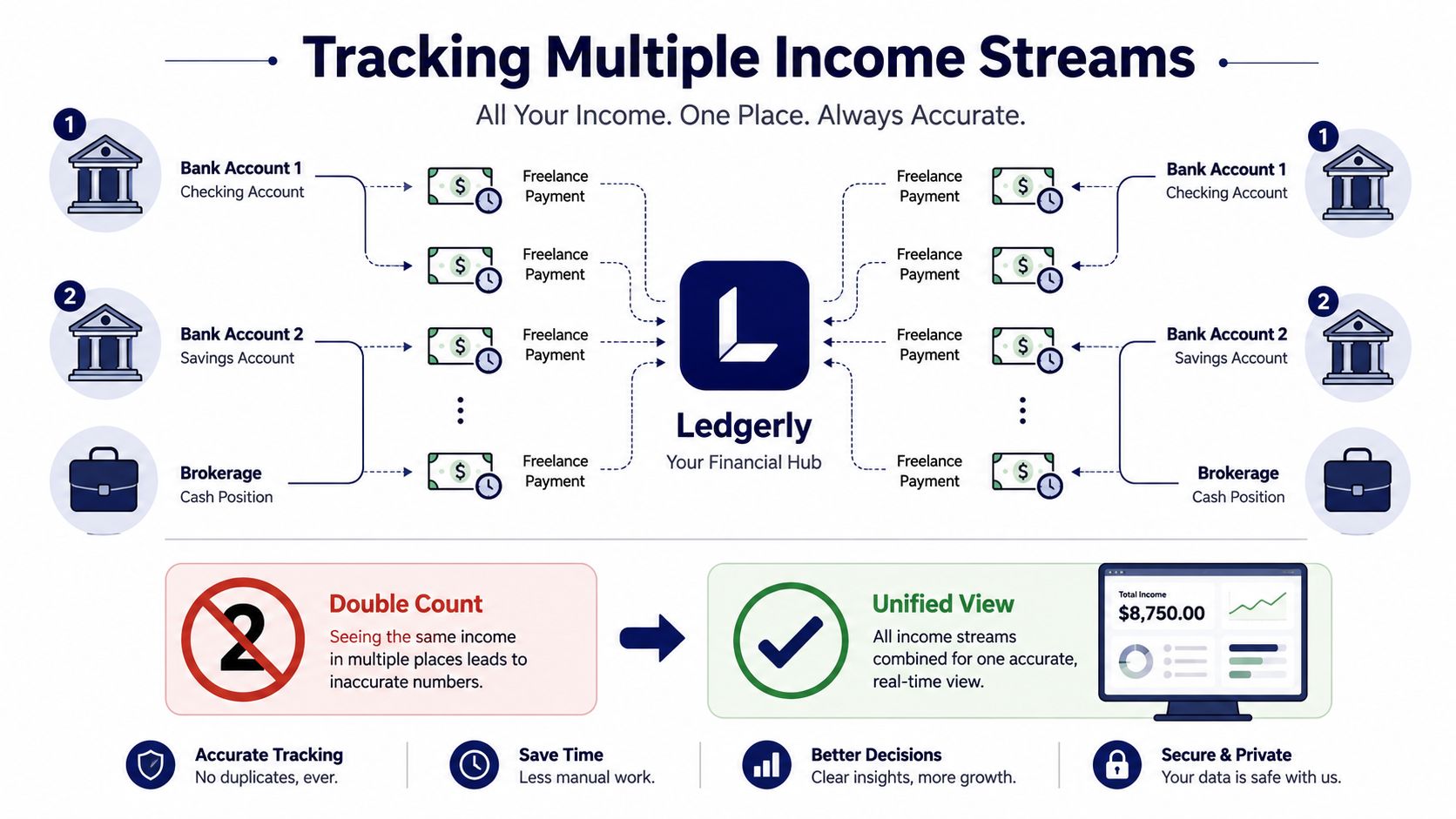
Irregular income is where manual trackers either become useful or become annoying. A freelancer might get paid three to seven times a month across two bank accounts, then move part of that money into a brokerage cash position while also carrying one shared credit card and one personal card. If the app doesn't handle transfers cleanly, the total gets messy fast.
Ledgerly treats transfers as paired movements, not new money. That means a move from checking to savings shows up as an outflow in one account and an inflow in the other, but the net worth total stays unchanged. That's the right behavior. You're rearranging assets, not earning income.
Variable pay needs a base and an override
Recurring items with unstable amounts need a simple rule set. A base amount gives the forecast a default, and an override replaces it when the month is unusual. Without that separation, next month can inherit the wrong number from last month's actuals.
This is the kind of detail that decides whether a manual app feels accurate. If a software tool makes every irregular bill look like a stable one, the plan view turns into fiction.
Corrections should be visible, not buried
Balance corrections should write directly to the running total and leave an audit row behind. That row needs a timestamp, the prior value, and a reason note. Otherwise the app becomes hard to trust after a few months of fixes and reconciliation.
The same logic applies to shared finances. Ownership and permissions matter when accounts are split across people, and transaction context matters when money moves between wallets, checking, savings, and cards. If the app can't preserve that context, it will overcount or misclassify the very movements users care about most.
The monthly routine can stay simple. Compare on-ledger totals to bank statements, confirm transfers, and correct anything that's off by more than a modest tolerance. The exact process is more important than the number, because the workflow itself keeps drift from turning into a reconciliation mess. For a practical walkthrough on card payments and transfers, the credit card payment tracking guide is the relevant reference.
Who Should Pick Which Net Worth Tracking App
A solo tracker with two bank accounts and a brokerage should pick a manual-first app like Ledgerly. The weekly entry load stays manageable, and the balances never need to leave the device unless the user chooses to back them up. That profile gets the privacy benefit without drowning in maintenance.
Someone managing five or more financial institutions with frequent transactions across them should choose a bank-linked aggregator. The automation is doing real work in that case, and the user is explicitly trading credential sharing for speed. That's a fair trade only when the person wants continuous sync.
The right tool depends on tolerance, not ideology
Open-source envelope tools fit users who are comfortable with setup friction and want community-audited code. They're best when transparency matters more than slick mobile UX. Spreadsheets remain the right answer for people who want total control and don't mind being their own support team.
Each option has a profile that loses. Ledgerly is the wrong choice if you need real-time transaction feeds. Aggregators are the wrong choice if storing bank credentials on a third-party server is a dealbreaker. Spreadsheets fail when you want fast mobile entry and don't want to debug your own formulas.
| Reader profile | Best fit | Why it fits | What it gives up |
|---|---|---|---|
| Solo tracker | Ledgerly | Manual entry stays quick enough for a small setup | Real-time sync |
| Multi-institution household | Bank-linked aggregator | Automation covers more accounts | Credential custody |
| Technical privacy seeker | Open-source envelope tool | Auditable code path | Convenience |
| Control-first planner | Spreadsheet | Full ownership and no vendor lock-in | Speed and mobile ease |
The decision rule is blunt. If you have a small set of accounts and care more about local privacy than live feeds, pick the manual route. If you have many institutions and value automation more than data custody, use an aggregator and accept the trade-off.
Privacy Questions Real Readers Ask Before Switching
The first question is where the data lives. In Ledgerly's model, transactions, balances, and categories stay in an on-device database by default, and nothing is uploaded anywhere unless the user turns backup on. That matters because it keeps the default state simple, local, and inspectable.
The second question is what happens when you do want a backup. Ledgerly's backup model is user-controlled. It copies the app's own database file to iCloud, Google Drive, or local storage at your discretion, and it does nothing until you switch it on. That's a cleaner setup than handing a budget app standing visibility into your records.
Account creation shouldn't be a gate
The third question is whether the full app works without an account. It does. Multi-account tracking, budgets, and net worth calculation don't need an email address, a sign-in flow, or a profile to access the core features. That's a meaningful privacy test because it separates usage from identity collection.
The fourth question is migration. Ledgerly has no import, so the practical route is to export your old app's data and keep that file as your history, set your opening balances in Ledgerly, then record forward from that date. It is a clean break rather than a column mapping exercise, and it takes an evening.
| Question | Ledgerly Answer | Bank-Linked Aggregator Answer |
|---|---|---|
| What is stored locally? | Transactions, balances, and categories stay on-device by default | Core data usually lives in the vendor's system after sync |
| Is backup optional? | Yes, and it stays off until you switch it on | Backup behavior depends on the platform |
| Do I need an account? | No account or email is required for core use | Usually yes, plus linked accounts |
| Can I migrate data? | Export is straightforward, and you start fresh rather than importing | Exports exist, but the source data already crossed a service boundary |
The reason switching costs are low is simple, the user owns the data throughout the transition. For Ledgerly's privacy details and data handling model, see the privacy page. If you want a net worth tracker that keeps the default workflow on-device and avoids bank logins, try Ledgerly and test whether manual control fits the way you already manage money.