September 20, 2026
Monthly Budget Tracker That Actually Works
Build a monthly budget tracker you will stick with. Learn to set categories, handle recurring bills, reconcile accounts, and review progress without the
monthly budget trackerbudget apppersonal financeexpense trackingbudget review
You open your banking app on payday, see the salary land, and still feel behind. Rent has already gone. Card payments are pending. A few subscriptions will hit sometime this week. You know you meant to track all of this, so you open your budget sheet or app and find a mess of half-used categories, missed entries, and totals you no longer trust.
That's the point where many people decide budgeting “doesn't work for them.” Usually, the tracker isn't the problem. The problem is the operating system around it.
A good monthly budget tracker isn't motivational. It's mechanical. It has to survive forgotten subscriptions, uneven pay dates, transfer noise, and the very human urge to avoid numbers when a month goes sideways. The tracker that works is the one you can still use after a missed week, a surprise bill, or a low-income month.
The practical challenge is bigger than setting categories once and admiring a tidy dashboard. In 2024, the average U.S. household spent $6,545 per month, up from $6,440 in 2023, with housing the largest category at $2,189 monthly, transportation at $1,110, and food split between $519 at home and $329 away from home, according to Chase's summary of Bureau of Labor Statistics data. A tracker has to handle that recurring weight month after month, not just display a plan.
Table of Contents
- Why a Monthly Budget Tracker Quietly Fails
- Setting Categories That Match Real Pay
- Handling Recurring Items Without Forgetting Them
- Logging Transactions and Keeping Accounts Honest
- Turning Totals Into a Daily Spending Number
- Mid-Month Check-Ins and End-of-Month Reviews
- Choosing the Right Tracker for Your Situation
Why a Monthly Budget Tracker Quietly Fails
Most failed budgets don't fail on day one. They fail around day twelve.
The first week feels clean. Categories are fresh. You log a few purchases. Then real spending shows up. Rent is easy, but the grocery split gets fuzzy. A yearly renewal posts from an old card. Someone pays for dinner from the wrong account. A utility bill lands higher than expected. By the middle of the month, the tracker starts asking for admin work you never planned to do.
The breakdown happens in the middle
I've rebuilt my own system enough times to know the weak spots by memory. They're usually the same:
- Imagined categories: You create neat labels based on how you want to spend, not how money leaves your accounts.
- Forgotten recurring items: Old subscriptions, annual renewals, and irregular direct debits sit outside the plan until they reappear.
- Drifting balances: A few missed entries turn the running total into fiction.
- Avoidance: Once the numbers feel slightly embarrassing, people stop opening the tracker.
That last part matters more than most budgeting advice admits. Friction kills consistency. Independent budgeting-app reporting and research summaries repeatedly note that many users abandon budgeting tools within the first month, largely because logging takes too many steps, feedback arrives too slowly, and messy data creates correction work, as summarized by Got A Prob's review of budgeting stickiness and budget behavior.
Practical rule: If your monthly budget tracker takes too long to maintain when life is normal, you won't use it when life gets messy.
Visibility alone doesn't fix behavior
There's another trap. Seeing budget numbers can help, but raw visibility isn't enough. The same behavioral summary above notes that having budget visibility can increase spending near the end of the budget period. People see “money left” and mentally reclassify reserved cash as spare cash.
That's why the fix isn't “be more disciplined.” The fix is operational. Shorter category lists. Scheduled recurring items. Clear transfer handling. A daily spend number that respects upcoming bills. Mid-month checks instead of constant staring.
A monthly budget tracker works when the maintenance load stays low and the feedback arrives in time to change what you do next.
Setting Categories That Match Real Pay
Start with take-home pay, not salary. If your income varies, use the lowest realistic monthly income floor, not an optimistic average. That approach is better for irregular earners because it reduces forecast error in lean months and leaves room to route surplus toward savings or debt instead of inflating lifestyle spending, as outlined in AuriTrack's budget planner method.
A category system should match cash reality, not a template you found online. The cleanest way to do that is to sort spending into tiers.
Build tiers before you name subcategories
I use four layers:
Non-negotiables
Rent, mortgage, minimum debt payments, insurance, core utilities.Committed lifestyle costs
Transport passes, childcare, phone plan, internet, school costs.Flexible spending
Groceries, eating out, fuel top-ups, household bits, personal spending.Goals and buffer
Savings, debt overpayments, sinking funds, and slack for uneven months.
This isn't just tidy accounting. It tells you what can move when income is tight.
Work from a real-pay example
Below is a worked example on £2,400 take-home pay. It's only a model, but it shows the logic clearly.
| Tier | Categories | Example Share | £ Amount |
|---|---|---|---|
| Non-negotiables | Rent | 42% | £1,008 |
| Non-negotiables | Utilities | 6% | £144 |
| Committed lifestyle costs | Transport | 12% | £288 |
| Flexible spending | Food | 14% | £336 |
| Goals and buffer | Savings, personal spending, household slack | 26% | £624 |
That kind of split usually looks more realistic than the fantasy budgets people build on a Sunday afternoon. It also lines up with the broader pattern seen in household spending data, where a few major categories dominate monthly outgoings. In the U.S., housing, transportation, and food account for a large share of the average household budget, based on the same BLS-backed Chase summary.
Use a short look-back, not a generic template
Before finalizing categories, review your last few months of actual outflows. Cards, transfers, cash withdrawals, standing orders, all of it. You're looking for repeated movement, not theoretical priorities.
Keep the list short enough that you can scan it in seconds. If two categories don't regularly lead to different decisions, merge them. “Dining out” and “coffee” only deserve separate lines if that distinction changes behavior. Otherwise they're both food leakage.
Most people don't need more categories. They need fewer categories that mean something.
A monthly budget tracker becomes easier to maintain when each line earns its place. If a category doesn't move money regularly, or doesn't help you decide what to do next, it probably belongs inside a broader bucket.
Handling Recurring Items Without Forgetting Them
Recurring items shouldn't live in your head. They should live on a schedule.
That sounds obvious, but it changes how a monthly budget tracker behaves. Instead of treating rent, salary, subscriptions, and renewals as surprises you happen to remember, you treat them as expected events with dates, amounts, and status.
Keep one visible upcoming list
The simplest setup is a single Upcoming list at the top of your tracker, sorted by date. Every recurring item gets one of three statuses:
- Confirmed for items with fixed amounts and known dates
- Expected for variable bills that usually land in a narrow window
- Overdue when the date has passed and nothing posted
That one view does more work than most charts. It stops your budget from becoming a memory test.
Fixed recurring items are straightforward. Rent, salary, subscriptions, loan payments. Variable recurring items need a slightly different treatment. Utilities, fuel auto-top-ups, and card bills may vary in amount, but they still belong on the schedule if they recur in a predictable window.
Annual costs need monthly treatment
The most annoying budget ambushes are annual or irregular bills you knew about but didn't prepare for. Domain renewals, memberships, car fees, gifts, school costs, insurance extras. Don't let them hit the live month in full if you can avoid it.
Spread them into a sinking fund category. The actual annual charge still posts when due, but your tracker has already been reserving for it. That turns a nasty spike into a planned release of money.
If credit cards are part of your monthly routine, it helps to separate the spending date from the payment date. People often feel broke twice. Once when they spend, and again when the statement gets paid. A clear payment routine matters, especially if you're reconciling multiple accounts. If you want a cleaner way to structure that side of the system, this guide on tracking credit card payments is worth reading.
If an item recurs, put it on the schedule before you trust yourself to remember it.
That one habit removes a surprising amount of budget anxiety. Forgotten recurring items aren't random. They're usually just unscheduled.
Logging Transactions and Keeping Accounts Honest
Transaction logging is boring. That's why it matters.
A monthly budget tracker only stays useful if each entry is quick and consistent. Every transaction needs just four things: date, amount, account, and category. You can add a note when it helps, but don't turn every coffee into a bookkeeping event.
Fewer categories make entry faster
They overbuild the category field. They create a dozen labels, then hesitate over every purchase. The slowdown adds up. For manual entry, five to eight spending categories is usually enough to keep the picture readable without creating constant second-guessing.
Logging cadence matters just as much as structure. Don't leave it for a massive Sunday repair session if you can avoid it. Memory gets sloppy, receipts disappear, and corrections multiply. A short, fixed routine on the same phone at roughly the same time works better than heroic catch-up sessions.
Transfers are moves, not spending
Many trackers go wrong. If you move money from checking to savings, you have not spent it. You've changed location, not reduced net worth.
Use a transfer entry or a paired move that nets to zero on spending reports. The same rule applies when you pay a credit card from checking if the original purchases were already logged as expenses. The payment settles a liability. It is not new spending.
| Transaction | Correct Entry | Common Mistake |
|---|---|---|
| Move money from checking to savings | Record as Transfer between accounts | Log as spending from checking |
| Pay credit card bill for already logged purchases | Record as Transfer or liability payment | Log as a new expense |
| Correct account balance after missed entries | Add one Adjustment line with reason | Rewrite old transactions one by one |
| Grocery purchase on debit card | Record date, amount, account, category | Leave account blank or guess later |
Corrections should be simple
If your account balance and tracker balance disagree, don't punish yourself with forensic accounting unless the error is large and recent. Add a single Adjustment line with the date and a brief reason, then keep going.
That preserves honesty without turning your budget into a history project.
Manual entry does cost time. But it also has clear trade-offs in its favor. You stay close to your numbers. You avoid bank linking. You catch duplicates and odd charges because you see each line on purpose. That's one reason privacy-minded users still prefer manual systems, especially now that data-sharing concerns around budgeting apps are harder to ignore. Independent audits found 60% of 20 popular budgeting apps shared at least some user data with third parties, and one report said nearly one-third of collected data was shared, according to Incogni's review of budgeting-app privacy.
For a practical example of a manual, on-device setup, Ledgerly's personal finance tracker guide shows the kind of workflow that works well when you want recurring items, transfers, and adjustments without bank connections.
Turning Totals Into a Daily Spending Number
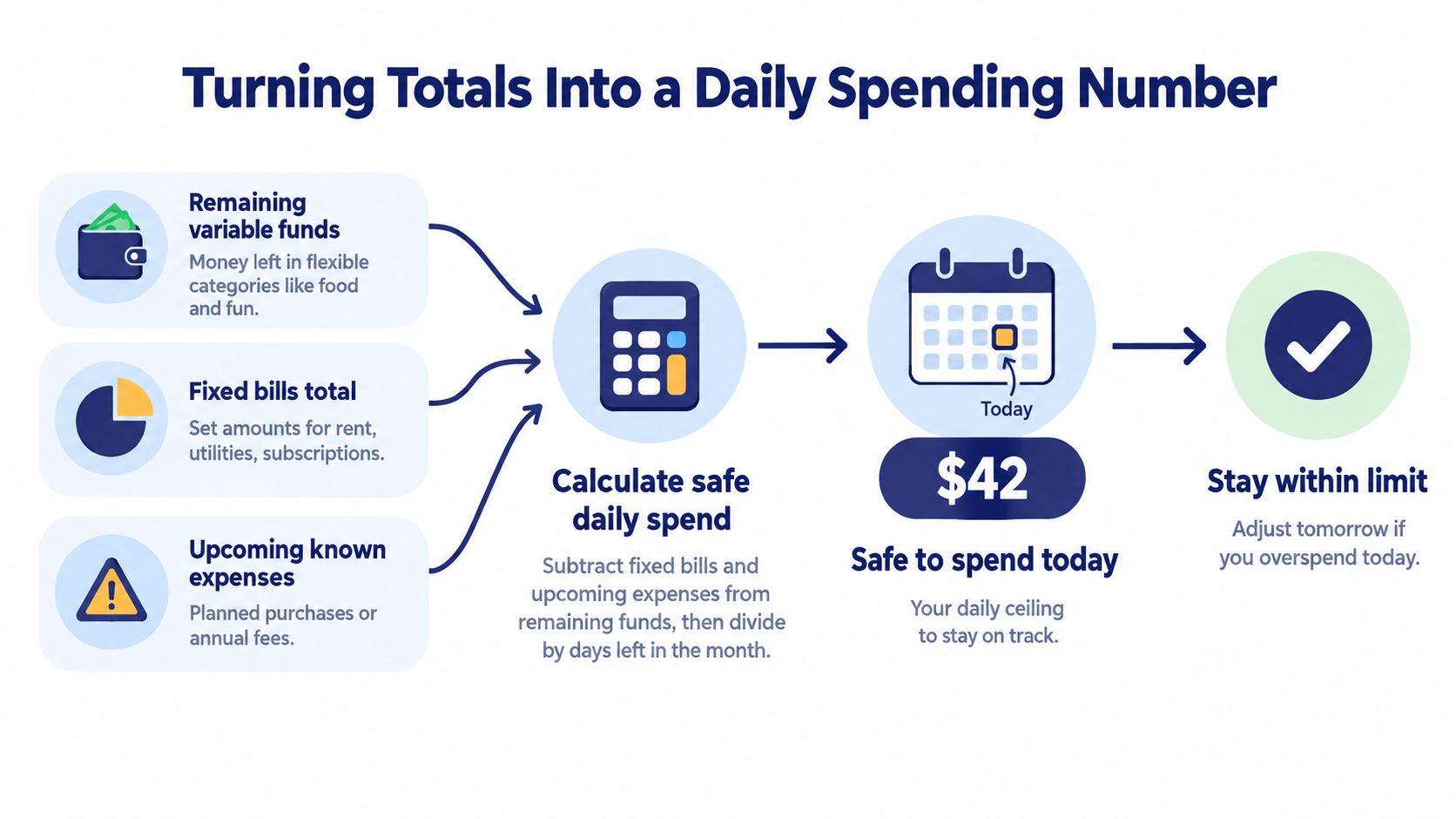
Monthly totals are too abstract for day-to-day decisions. “You've spent £287 on food” doesn't tell you whether takeaway tonight is fine or stupid. A better monthly budget tracker turns the month into a single number you can use today.
The useful number is safe to spend today. It comes from three inputs:
- Remaining variable money
- Upcoming scheduled items
- Days left in the period
Use a simple calculation
The working formula is:
(Remaining variable money minus upcoming scheduled items) ÷ days remaining
Example:
- Remaining across food, transport, and personal spending = $1,200
- Upcoming groceries or planned purchases before next reset = $300
- Days left in the month = 12
Safe to spend today = ($1,200 minus $300) ÷ 12 = $75
That number is far more actionable than a giant monthly total. It tells you the pace you need to maintain, not just the amount already spent.
Keep category guardrails in place
There's one catch. A daily spend figure can become too permissive if it pulls from a shared pool with no category boundaries. If food runs hot this week, it can borrow from transport or household costs unless you keep separate caps for problem categories.
Use the daily number as a pacing tool, not as permission to ignore category drift.
If your pay is irregular, this gets even more important. Public guidance for variable-income budgeting increasingly points people back to real cash flow, using conservative income assumptions and regular updates rather than pretending every month behaves the same. That's the practical gap many monthly tracker articles miss. They stop at category totals and never translate them into a safe day-by-day limit. For a related planning method, this article on a payday budget planner fits people whose budget period isn't a neat calendar month.
“Safe to spend” works best when you recalculate after meaningful changes, not after every tiny purchase.
Update it every few days, or after a deposit, a major bill, or a schedule change. Recomputing it obsessively each morning turns the tracker into noise. You want guidance, not a slot machine.
Mid-Month Check-Ins and End-of-Month Reviews
A tracker doesn't need daily devotion. It needs two repeatable rituals.
The first is a mid-month check-in. The second is an end-of-month review. Both are short. Both matter more than most dashboards.
The mid-month check catches drift early
Around the middle of the month, sit down for a brief review. Not a deep dive. Just enough to check whether the plan still matches reality.
Use a checklist:
- Confirm recurring items posted: Rent, subscriptions, minimum payments, salary.
- Scan for unlogged transactions: Small card spends and auto-renewals are the usual misses.
- Check spending pace: If a category is burning too fast relative to the month, tighten the next stretch.
- Review upcoming items: Make sure expected bills still have room.
A monthly budget tracker earns its keep. It gives you time to intervene while the month is still salvageable.
End-of-month is for cleanup and learning
Month-end is not for guilt. It's for closing the books.
Reconcile each account to its statement or known balance. Mark recurring items as paid, delayed, or missed. Then write two short notes: what held, and what you'll change next month. That tiny bit of written reflection often matters more than any graph because it converts a messy month into a better next month.
There's another reason not to spend all month staring at balances. In the budgeting research summary cited earlier, simple visibility near the end of the budget period can encourage extra spending if people treat the unspent balance as available windfall. The answer isn't ignorance. It's structure. Mid-period pacing works better than end-of-month temptation.
Archive, don't erase
Keep closed months.
A single month can lie to you. Six months of clean history will show patterns. Which subscriptions keep slipping through. Which categories are permanently underfunded. Which weeks go off track after certain bills post. That's operational history, and it's much more useful than a motivational reset every month.
If you underspend in a category, decide deliberately what happens next. Roll it forward, move it to savings, or leave the next month unchanged. What you don't want is silent rollover that gradually bloats spending targets without anyone noticing.
Choosing the Right Tracker for Your Situation
A plain spreadsheet, notes file, or paper notebook often beats a feature-heavy budgeting app. Not because it's smarter. Because it's harder to avoid.
That runs against the usual advice, but it matches how people behave. One recent industry summary says 74% of Americans say they have a budget, while only 36% actively track spending against it, and 26% use an app or software to do so, according to Ai Money Vault's budgeting and expense tracking summary. The gap isn't usually lack of intent. It's the upkeep.
Match the tool to the person
Different situations need different formats.
| Situation | Best Fit Format | Key Trade-Off |
|---|---|---|
| Variable-income freelancer | Spreadsheet or manual app with custom periods | More hands-on work, but better cash-flow control |
| Dual-income household | Shared spreadsheet or shared-access app | Requires agreement on categories and review rhythm |
| Privacy-focused user | On-device manual app or offline sheet | No automatic imports, so consistency matters |
| Debt-payoff planner | Simple spreadsheet with debt and transfer visibility | Less visual polish, but cleaner control over priorities |
The right question isn't “Which app has the most features?” It's “Which system still works after I miss a week?”
Four practical fits
For freelancers and irregular earners, manual control matters more than automation. You need to separate income timing from spending timing and often budget by fortnight or between paydays rather than by calendar month.
For a dual-income household, the hard part is usually shared visibility, not category math. A modest shared sheet can beat a complex app if both people use it.
For a privacy-focused user, on-device storage changes the trade-off. You give up bank syncing and get more control over your data. That's a fair trade for many people.
For a debt-payoff planner, simplicity wins. You need to see required payments, extra payments, and transfers clearly. Fancy trend charts won't help if credit card payments are being double-counted.
When a more specialized tool is worth it
A dedicated tool starts making sense when your budget has more moving parts than a plain sheet can comfortably handle. Shared household accounting, multiple currencies, recurring-item scheduling, clean transfer handling, and export durability are good reasons to level up.
One example is Ledgerly, which keeps data on the device, uses manual entry, supports recurring items and configurable periods, and treats transfers as moves rather than expenses. That kind of setup fits people who want a monthly budget tracker without bank connections.
Choose the tracker you can still trust after a messy month, not the one that looks impressive during setup.
A short decision checklist helps:
- Entry speed: Can you log a transaction fast enough that you'll do it?
- Recurring-item handling: Does the tool make upcoming obligations visible?
- Export durability: Can you get your data out cleanly later?
- Missed-week recovery: Can you recover without rebuilding the whole month?
If the answer to any of those is no, the tracker is probably too fragile.
Ledgerly is built for the kind of monthly budget tracker described here: manual entry, recurring items, on-device storage, clear transfers, and a Today view that surfaces a safe daily spending number without bank linking. If you want a privacy-first setup that can handle irregular pay and missed weeks without turning into a repair project, visit Ledgerly.