September 12, 2026
10 Budget Planner App Options for 2026
Compare 10 budget planner app options for manual planning, automation, privacy, household use, and flexible budgeting workflows in 2026.
budget planner appbudgeting appspersonal finance toolsmanual budgetingbudget planning
The most automated app isn't automatically the best budget planner app. Automation can save entry time, but it can also hide misclassified spending, depend on fragile bank connections, and make your budget feel like a dashboard you check rather than a plan you actively control.
The better question is: which budgeting workflow will you maintain? Some people want manual, privacy-first planning. Others need zero-based allocation, shared envelopes, household collaboration, automated categorization, daily spending guidance, or a broader view of investments and net worth. This comparison looks at each tool through that practical lens, including planning method, period configuration, entry effort, privacy, platform availability, pricing variability, and the limitations that become obvious after the initial setup.
The category itself remains specialized but is expanding. One 2026 forecast values the global budget apps market at USD 260.78 million in 2026, projecting USD 421.87 million by 2035 at a 5.49% CAGR. The same forecast says nearly 60% of users adopt these apps to track expenses and savings, while 45% use them for personalized financial guidance, which supports a focus on everyday spending control rather than financial automation alone (2026 budget-app market analysis).
Disclosure: Ledgerly is the publisher's product, so it appears first and receives extra detail. The comparison still includes its weaknesses, especially the manual entry requirement, alongside alternatives that may fit better if you want automatic imports or investment tracking.
Table of Contents
- 1. Ledgerly
- 2. YNAB
- 3. Monarch Money
- 4. EveryDollar
- 5. Goodbudget
- 6. Copilot Money
- 7. PocketGuard
- 8. Rocket Money
- 9. Wallet by BudgetBakers
- 10. Money Lover
- Top 10 Budget Planner Apps Comparison
- Choose the Planning System You Will Maintain
1. Ledgerly
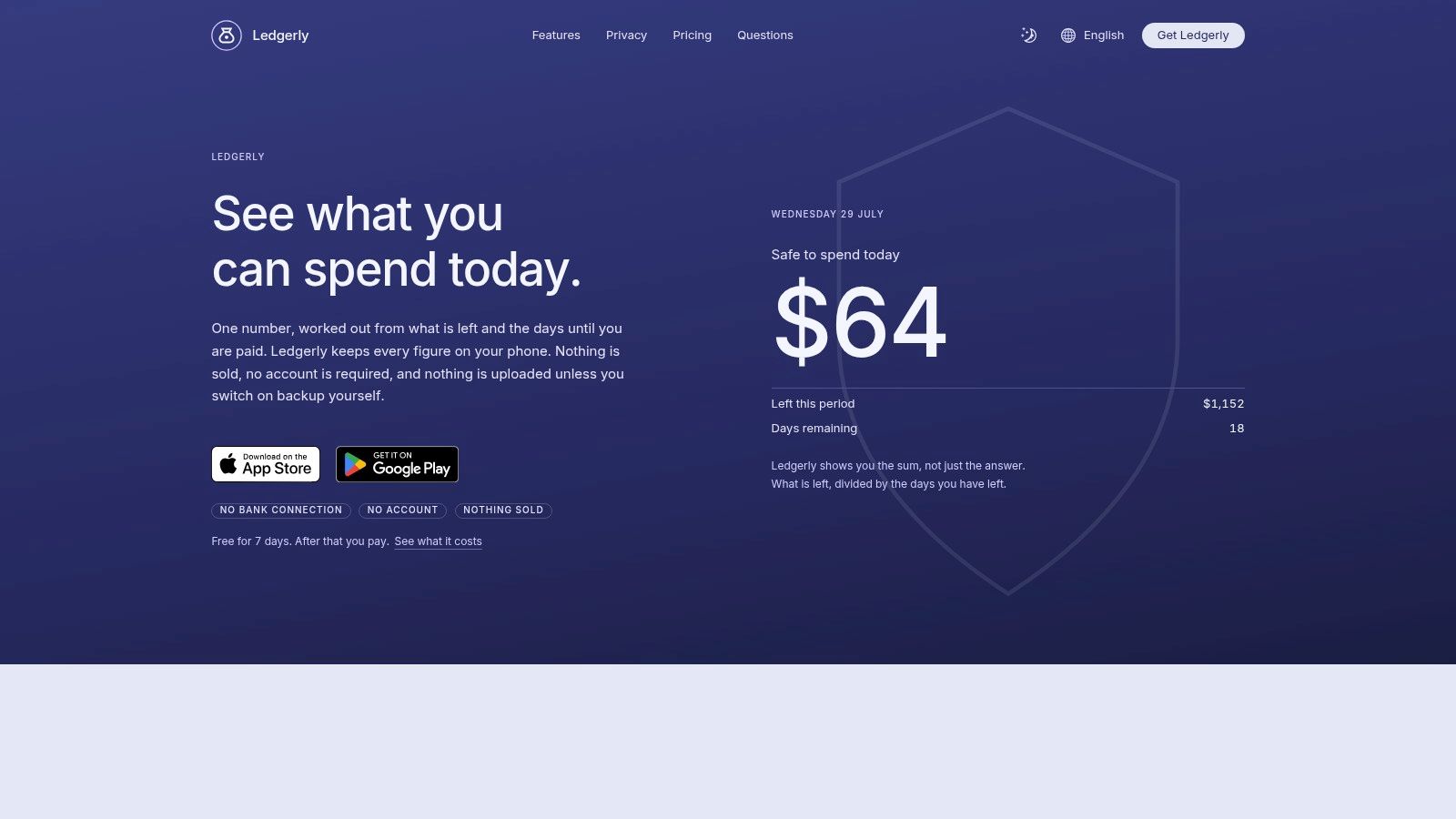
Ledgerly suits a manual, privacy-first budgeting workflow. It is a mobile budget and expense tracker for iOS and Android that keeps records on the phone unless you enable a backup. Bank connections, automatic categorization, and server-side transaction storage are not part of the default setup.
The trade-off is direct. You enter the amount, category, and account yourself, so the routine requires more attention than an automation-focused app. In exchange, you control each classification, can work offline, and do not need to share bank credentials with an aggregation service.
Where Ledgerly fits best
Ledgerly's four-tab layout, Today, Plan, Money, and Tools, keeps daily planning manageable. Today calculates “safe to spend today” from your remaining funds and the days until payday. Plan tracks category progress across monthly, fortnightly, or between-payday periods, making it suitable for irregular income and pay-cycle planning rather than only calendar-month budgets.
Set the planning period to match how money arrives, then record transactions as they happen. Recurring items such as salary, rent, and subscriptions appear under Upcoming. Transfers count as movements rather than expenses, so shifting money between your own accounts does not inflate spending. Money combines cash, checking, savings, and credit in one net total. A single adjustment line can correct an account balance without rebuilding older transactions.
Practical rule: For accurate records without bank syncing, enter each transaction at the point of purchase and check the Today figure before spending again.
Search covers notes, categories, and amounts. CSV export, optional backups to Google Drive, iCloud, or a local file, and app locking with a passcode or biometrics support review and data control. Ledgerly supports 165 currencies and five languages. The seven-day free trial begins after setup. Afterward, you can still read, search, export, and back up existing data, while new transactions require a subscription or lifetime purchase. Monthly, yearly, and lifetime options are available, with exact amounts determined by the App Store or Google Play in each country.
Best for: People who want on-device privacy, manual control, configurable pay-period planning, offline use, and a daily spending figure.
Main limitations: Manual entry takes time, and there is no bank import or automatic categorization for a hands-off routine. Product details are available from the Ledgerly product overview.
2. YNAB
YNAB is built around zero-based budgeting, where every available dollar receives a job. That method works well when you want your budget to shape decisions before you spend, rather than report what happened afterward. It's particularly useful for assigning money to bills, savings targets, debt payments, and flexible spending categories.
The app works across web and mobile, and users can connect banks in supported regions or rely on manual and file-based imports elsewhere. Manual entry remains practical for people who want more control, although the overall system asks you to maintain the budget actively. That's a feature for committed users, but a barrier for anyone looking for a passive spending tracker.
A method-led routine
Start by setting up the categories that reflect obligations and priorities, then assign available money until the plan is fully allocated. Each new paycheque becomes an opportunity to fund the next group of expenses, not merely an income entry. The workflow encourages regular reconciliation and category decisions, so it can build strong habits if you're willing to engage with it.
YNAB supports household sharing for up to six members under one subscription, and its education, workshops, and community resources help beginners learn the method (YNAB details and trial information). It also offers goal targeting and debt tools.
The cost is higher than some simpler alternatives, and the learning curve is real. You shouldn't choose YNAB because it has many features. Choose it because you want to follow a specific allocation system and are prepared to maintain it.
For a practical explanation of the underlying approach, see what budget planning involves.
Best for: Users who want structured zero-based budgeting, detailed goals, debt planning, and household participation.
Main limitations: It can feel demanding, and the subscription may not suit someone who wants lightweight manual tracking or a simple pay-period view.
3. Monarch Money
Monarch Money suits households that want a broad financial command center rather than a narrowly focused spending planner. It combines budgeting with account aggregation, net-worth tracking, custom reports, goals, and longer-term planning across web, iOS, and Android.
The app's strength is context. A household can view accounts, spending patterns, goals, and investments in one environment, which reduces the need to maintain separate tools. Collaboration also matters here. Partners can work from the same financial picture instead of keeping separate spreadsheets that need manual reconciliation.
Planning beyond the monthly budget
Monarch works best when you're comfortable linking accounts. Connected data supplies the foundation for reports and net-worth tracking, so a fully manual user may find that the app's biggest advantages are less relevant. Bank connections can also become the weak point when institutions require reauthentication or imports arrive late.
The Core and Plus tiers separate general money management from additional retirement forecasting and business tracking. That tier structure gives advanced households room to grow, but it also means you should check which planning features are included before subscribing.
If you're comparing budgeting with wider financial visibility, this net-worth tracking app guide provides useful context for deciding whether you need a budget tool or a financial dashboard.
Best for: Couples and households that want shared access, account aggregation, reports, goals, and net-worth visibility.
Main limitations: The subscription is on the higher side, and users who avoid bank links may not get the full benefit of the platform.
Visit Monarch Money for current platform and plan details.
4. EveryDollar
EveryDollar keeps zero-based budgeting approachable. Its core workflow is simple: create spending categories, allocate income, and record expenses against those categories. That simplicity makes it a reasonable starting point for beginners who want a method rather than a dashboard full of financial metrics.
The free web version is manual-first. Premium adds bank synchronization and automation, so users can begin with explicit entry and upgrade only if they decide convenience matters more than manual control. The app is closely associated with Ramsey Solutions' budgeting approach, which is an advantage if you already follow that framework and a limitation if you want a more flexible philosophy.
A straightforward envelope-style setup
EveryDollar works well when your planning period matches your income cycle. Enter expected income, reserve money for fixed bills, then allocate the rest across groceries, transport, discretionary spending, savings, and debt. Record each purchase as it happens, especially during the first few periods when you're learning whether the category amounts reflect reality.
Premium includes a 14-day trial for new users, while mobile support and some Premium features are primarily aimed at users in the United States. Availability outside the U.S. deserves attention before you commit.
The app has fewer advanced reports than broader financial platforms. That's not necessarily a problem. Beginners often need fewer decisions, not more charts. It becomes a drawback when you want detailed household analytics, multi-country functionality, or deeper investment tracking.
Best for: Beginners who want a clean zero-based method and users already comfortable with Ramsey Solutions' approach.
Main limitations: Premium features and availability are more limited outside the U.S., and the free version requires manual work without extensive analysis.
Find the current product information at EveryDollar.
5. Goodbudget
Goodbudget turns the classic envelope method into a shared digital workflow. Allocate money to envelopes such as groceries, rent, transport, holidays, or debt repayment, then record each purchase against the relevant category. The method makes remaining money visible, helping households connect spending decisions with specific purposes.
Its manual-first design defines the trade-off. Goodbudget does not require an automated workflow, while Premium adds bank syncing for users who want less entry work. Web and mobile synchronization lets couples review the same envelope balances across devices, but households that avoid linked accounts will need to maintain records manually.
Where shared envelopes work
Goodbudget suits couples who want to plan categories together while keeping spending decisions explicit. Create shared envelopes for joint bills and household goals, then separate personal categories when that better matches your arrangement. Scheduled allocations can prepare the next planning period without removing the review step that keeps the plan realistic.
Shared budgets fail when categories are vague. Name envelopes for decisions, not just account types. “Eating out” is easier to manage than a broad “lifestyle” envelope.
Set the planning period around your pay cycle or another date you can review consistently. Allocate income to fixed obligations first, then fund variable categories and savings. During the period, record purchases promptly and check envelope balances before discretionary spending. This routine makes Goodbudget a daily spending guide rather than only a monthly record.
The interface is functional rather than design-led. That helps users who value clear balances, but may disappoint anyone seeking rich forecasts or investment views. Advanced capabilities sit behind Premium, so compare the free plan with your household's envelope count, syncing requirements, and tolerance for manual work.
For more context on choosing a budget app for couples, check whether both people can see, update, and understand the same categories.
Best for: Couples and families who prefer manual envelope allocation and shared planning.
Main limitations: The interface is utilitarian, and advanced features require Premium.
Try the platform at Goodbudget.
6. Copilot Money
Copilot Money is designed for people who want automation and polished organization, especially within Apple's ecosystem. It combines spending budgets, automated categorization, investment tracking, rules, and performance views across web, iPhone, iPad, and Mac.
The app reduces manual effort by categorizing transactions and applying rules. That's convenient when your accounts connect reliably and your categories require only occasional correction. It's less appealing if you want every entry to be explicit, prefer offline operation, or don't want to link financial accounts.
Automation with a platform boundary
Copilot's investment features make it more than a basic budget planner. Users who want spending and investment information in one hub may appreciate the unified view. The free test-drive before linking accounts also gives you a way to inspect the workflow before committing to a connected setup.
The major platform limitation is straightforward: there's no Android app as of the stated product information. An Apple-focused household can treat that as irrelevant. A mixed-device household can't.
Automatic categorization should also be reviewed rather than trusted blindly. Merchants can appear under unexpected categories, and rules may need adjustment after unusual purchases. The time saved on entry can be lost if you never check whether the resulting budget reflects your actual priorities.
Best for: Apple users who want automated spending organization, investment tracking, and a polished interface.
Main limitations: The best experience assumes linked accounts, and Android users lack a native app.
See the current platform offering at Copilot Money.
7. PocketGuard
PocketGuard organizes budgeting around a simple question: what money is left after bills, goals, and planned obligations? That makes it a strong option for people who don't want to assign every unit of income to a detailed category structure but still need a practical spending boundary.
The app supports manual and bank-linked workflows, bill tracking, goals, debt payoff planning, and rollover budgeting. Its “leftover money” framing is useful when daily cash flow matters more than building a formal envelope system.
A useful daily decision tool
Set up recurring bills first, add goals, then review the amount available for flexible spending. This works well for someone who gets paid regularly and wants to know whether a purchase fits after obligations. Premium adds advanced categorization, rules, import, and export capabilities.
PocketGuard offers monthly, annual, and lifetime pricing options, which is useful when you're comparing ongoing subscription commitments with a one-time purchase. However, the most powerful features sit behind Premium, and the accuracy of connected bank data depends on the underlying connection.
The leftover number should support judgment, not replace it. A pending transaction, delayed import, or unrecorded cash purchase can make available money appear higher than it really is. Manual review remains necessary even when the app automates much of the work.
Best for: Users who want leftover-money guidance, bill tracking, goals, and debt planning without a highly formal allocation method.
Main limitations: Premium is needed for advanced capabilities, and bank-data quality can vary.
Review the current options at PocketGuard.
8. Rocket Money
Rocket Money is less of a pure budgeting method and more of an all-in-one spending and bill-management service. It combines budgeting and spend tracking with subscription monitoring, cancellation support, bill negotiation, credit score monitoring, and savings automations.
That broader scope can be valuable when recurring charges are the main problem. Instead of focusing only on category limits, you can identify subscriptions, examine bills, and use the platform to manage connected accounts. The free plan gives users a way to start without immediately paying for the complete feature set.
Where the extras help
Rocket Money's Premium plan uses a pay-what-you-want sliding scale, with a separate Premium+ option. That can make the cost more flexible, but you should understand what each tier includes before treating it as a conventional budget planner.
The bill negotiation service has a success fee if it saves you money. That structure may be reasonable when the service produces a result, but it's different from paying solely for software access. Users should also consider whether they want an app that emphasizes account connections and automation.
Rocket Money is most useful when subscription cleanup and bill oversight sit alongside everyday budgeting. It's less suitable for someone who wants a private, manual ledger or a category-by-category envelope routine.
Best for: People who want subscription monitoring, bill management, spend tracking, and savings-related extras.
Main limitations: The workflow leans heavily on connected accounts and automation, and bill negotiation can involve a success fee.
Explore the current tiers at Rocket Money.
9. Wallet by BudgetBakers
Wallet by BudgetBakers is a flexible option for users whose finances span multiple wallets, currencies, accounts, or household members. It supports manual entry and Premium bank synchronization across web, iOS, and Android, with budgets, goals, reports, and shared wallets.
That flexibility makes it useful for people who travel, manage more than one currency, or separate household money from personal funds. You can begin manually, then add synchronization if you decide the convenience is worth the privacy and reliability trade-off.
A flexible but variable platform
Wallet supports different budget types rather than forcing one method on every user. That's helpful when a household combines category limits, goals, scheduled payments, and account-based tracking. Shared wallets can also give partners a common view without requiring every account to be treated identically.
Pricing requires more attention than with products that publish one universal offer. Monthly, yearly, and lifetime Premium options may be available, but pricing can vary by region and store, and the public pricing presentation isn't always consistent. Some advanced exports and synchronization features require Premium.
Bank syncing also introduces the familiar dependency on connection quality. Manual entry remains available, so users can keep a hybrid workflow, recording sensitive or cash transactions themselves while using imports for routine activity.
Best for: Households, travelers, and users who need multi-currency support, shared wallets, and flexible account organization.
Main limitations: Pricing varies by region or store, and advanced exports or bank synchronization may require Premium.
Check the current product details at Wallet by BudgetBakers.
10. Money Lover
Money Lover is a manual-friendly tracker for users who want budgets, wallets, reminders, debts, and multi-currency support without committing to a bank-linked dashboard. It works across iOS and Android, includes a web companion, and offers CSV or Sheets export options.
The practical advantage is breadth without requiring automatic imports. You can create wallets for cash, bank accounts, travel funds, or side projects, then record expenses and income directly. Bill reminders and debt tracking add structure for users who want more than a basic spending log.
A capable manual setup
Create separate wallets only when they represent a meaningful distinction. Too many wallets make daily entry slower and can obscure your overall position. Use recurring reminders for predictable bills, then review the wallet balances at the end of each planning period.
Premium removes ads and provides additional wallets and features. A lifetime purchase is available in some stores, but pricing and availability can differ by platform. The interface feels dated compared with newer apps, and Linked Wallet functionality is separate from Premium, so confirm the exact feature boundaries before purchasing.
Money Lover works best when you're comfortable doing the bookkeeping yourself. It won't provide the same connected automation as Copilot Money or the same broader financial dashboard as Monarch Money, but it gives hands-on users a useful combination of manual records, reminders, debt tracking, and exports.
Best for: People who want manual entry, multiple wallets, multi-currency support, reminders, and a web companion.
Main limitations: The interface is less modern, and some online features are separate from the main Premium offering.
Visit Money Lover for the current platform information.
Top 10 Budget Planner Apps Comparison
| App | Core features (✨) | UX & character | Target audience (👥) | Pricing / Value (💰) |
|---|---|---|---|---|
| Ledgerly | ✨ On‑device by default, with backup the only thing that copies data off, manual entry, recurring, Today "safe to spend", Plan periods, transfers-as-moves, CSV & backups | focused, neutral feedback | 👥 Privacy‑minded manual budgeters, households & side projects | 💰 7‑day trial; monthly/yearly/lifetime via app stores; single transparent tier |
| YNAB | ✨ Zero‑based budgeting, targets, sharing, bank/file imports, education | habit‑building, proven | 👥 Committed budgeters, households wanting strict budgeting | 💰 34‑day trial; subscription (higher price) |
| Monarch Money | ✨ Net‑worth, custom reports, forecasting, investments (Plus), household sync | polished reporting | 👥 Users wanting planning + investment tracking | 💰 Core & Plus subscriptions; higher‑tier pricing |
| EveryDollar | ✨ Envelope/zero‑based flow, free manual web, Premium adds bank sync | simple, beginner‑friendly | 👥 Beginners and Ramsey method followers | 💰 Free basic; Premium subscription (14‑day trial) |
| Goodbudget | ✨ Digital envelopes, scheduled allocations, shared wallets, manual‑first | clear envelope system | 👥 Couples/households who share budgets | 💰 Free basic; Premium for extra envelopes/sync |
| Copilot Money | ✨ Automated categorization, investment tracking, cross‑platform (no Android) | elegant, automation‑heavy | 👥 Users who want automation + investment insights | 💰 Subscription with free test‑drive before linking |
| PocketGuard | ✨ "Leftover" guidance, bill tracking, goals, debt planner, import/export | practical, transparent | 👥 Users wanting disposable‑cash guidance | 💰 Free + Premium; monthly/annual/lifetime options |
| Rocket Money | ✨ Subscriptions tracking/cancel, bill negotiation, credit & automations | all‑in‑one services | 👥 Users wanting subscription/bill services & automation | 💰 Free plan; Premium pay‑what‑you‑want (Premium+) |
| Wallet (BudgetBakers) | ✨ Multiple budgets, reports, multi‑currency, shared wallets, bank sync | flexible for complex setups | 👥 Multi‑currency households & power users | 💰 Free + Premium (monthly/yearly/lifetime in some stores) |
| Money Lover | ✨ Manual entry, wallets, bill reminders, debt tracking, CSV export | solid manual workflows | 👥 Manual trackers wanting reminders & simple wallets | 💰 Free + Premium; lifetime available in some stores |
Choose the Planning System You Will Maintain
The right budget planner app depends on the routine you'll repeat. Market adoption supports that practical focus. A U.S. survey found that 63% of smartphone users had at least one financial app, but only 18% had a standalone budgeting app installed. Among budgeting-app users, 56% used the apps at least weekly, which suggests the challenge isn't just finding an app. It's finding a workflow that earns a regular place in your day (U.S. fintech survey).
Choose Ledgerly if you prioritize on-device privacy, manual accuracy, offline operation, configurable monthly, fortnightly, or between-payday periods, and a daily “safe to spend today” figure. It's a particularly good fit for irregular income, multiple accounts, users who don't want bank connections, and anyone who prefers to review each transaction explicitly.
Choose YNAB or EveryDollar if you want method-led zero-based budgeting. YNAB offers a deeper education and goal system, while EveryDollar keeps the core approach simpler and is especially suitable for users already following Ramsey Solutions' framework. Expect to allocate money actively rather than merely observe spending.
Choose Goodbudget for shared envelope planning. It gives couples and households a tangible way to divide available money into categories, although its interface is more utilitarian and some capabilities require Premium. Choose Monarch Money or Wallet by BudgetBakers when you need broader household views, account aggregation, reports, shared access, or net-worth context. Monarch is more design-led and planning-oriented, while Wallet offers useful flexibility across currencies, wallets, and account types.
Choose Copilot Money if you use Apple devices and want automation, categorization rules, and investment tracking. Choose PocketGuard if the most important question is how much remains after bills and goals. Choose Rocket Money if subscription monitoring and bill-management extras matter as much as category budgeting. Choose Money Lover if you want a manual-friendly, multi-wallet setup with reminders, debt tracking, and exports.
A 2024 survey found only 30.4% of respondents were satisfied or very satisfied with their current mix of personal finance apps, while 40.34% were neutral and 9.4% were dissatisfied or very dissatisfied. Those results point to a consolidation opportunity, but adding another app won't solve the problem unless it reduces friction in your actual routine (2024 personal-finance-app survey).
Use this implementation sequence:
- Match the period to your income: Choose monthly planning for regular monthly income, fortnightly planning for biweekly pay, or a between-paydays period when your cash flow doesn't follow a calendar month.
- Enter recurring money first: Add salary, benefits, predictable freelance income, rent, utilities, subscriptions, and other fixed obligations.
- Assign categories before discretionary spending: Fund essentials and goals, then decide what remains available for flexible purchases.
- Record transfers separately: Moving money between checking, savings, cash, and credit accounts isn't spending. Treating it as an expense can distort both category totals and net worth.
- Review at each period boundary: Compare planned categories with actual activity, adjust unrealistic amounts, and carry forward only what still reflects your priorities.
- Confirm the data model: Check whether the app stores records locally, requires bank credentials, supports manual entry, offers exports, and handles backup the way you expect.
The most useful app isn't the one with the longest feature list. It's the one that makes your next spending decision clearer without creating more maintenance than you'll tolerate.
Ledgerly gives you an on-device budgeting workflow with manual entries, configurable planning periods, recurring items, transfer handling, CSV export, and a daily “safe to spend today” figure. If privacy, irregular income, and hands-on accuracy matter more to you than automatic bank syncing, visit Ledgerly and test whether its focused routine fits the way you manage money.