September 16, 2026
10 Household Budget App Options for Shared Money
Compare 10 household budget app options for shared expenses, multiple budgets, privacy, automation, and practical household money management.
household budget appbudgeting appsshared expensescouples budgetingpersonal finance
The popular advice is to find the “best” household budget app and make everyone use it. That approach usually fails. A couple managing shared bills, separate spending, irregular income, and privacy concerns isn't solving one problem. They're choosing how money should move through their household workflow.
The important questions come first. Do you want manual control or automatic bank imports? Should both partners see every transaction, selected transactions, or only shared categories? Do you need envelope discipline, a daily safe-to-spend figure, cash-flow forecasting, subscription cleanup, or a private offline record? The right app is the one your household will maintain after the initial setup feels less exciting.
The market supports several distinct approaches. One independent report estimates the budgeting-app market at $1.85 billion in global revenue in 2025, with a projection of $4.32 billion by 2034 and a 10.2% compound annual growth rate. It also places personal finance at 42.3% of market share and North America at 38.5% of revenue. The market report says the user base reached about 950 million active monthly users by 2026, while shared budgeting remains comparatively underused among households with multiple adult decision-makers.
The ten options below are compared by the workflow they support, not by feature count. Some are strongest for privacy-first manual tracking, others for envelope budgeting, automated cash flow, shared visibility, or subscription control.
Table of Contents
- 1. Ledgerly
- 2. You Need A Budget
- 3. Monarch Money
- 4. Quicken Simplifi
- 5. Copilot Money
- 6. EveryDollar
- 7. PocketGuard
- 8. Rocket Money
- 9. Goodbudget
- 10. Honeydue
- Top 10 Household Budget Apps, Features & Pricing Comparison
- Choose the App Your Household Will Actually Maintain
1. Ledgerly
Ledgerly suits a household where one person keeps the records. The iOS and Android app does not connect to banks, import transactions automatically, or require a cloud account, and it does not share data between phones. The person who keeps the budget records purchases, creates recurring items for salary, rent, and subscriptions, and can keep working offline.
Manual entry takes more effort than bank aggregation, especially in a shared household. The benefit is control over categories and timing. A coffee is not misclassified by an automated system, and transfers between checking and savings are recorded as moves rather than expenses, so the same money is not counted twice.
A daily view built for real decisions
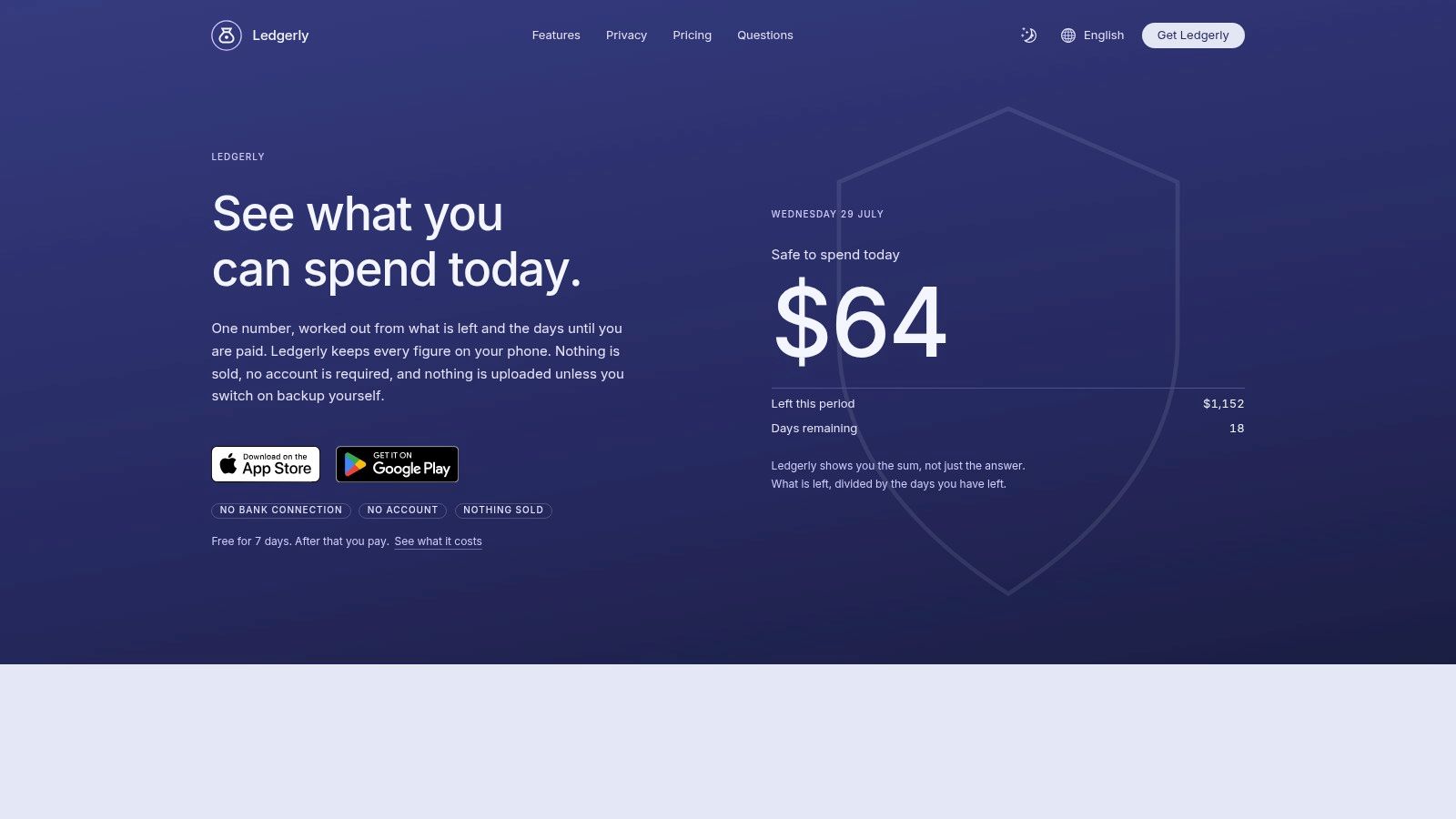
Ledgerly's four-tab structure, Today, Plan, Money, and Tools, keeps routine decisions visible. Today calculates a safe to spend today figure using remaining funds, upcoming items, and the days left in the selected period. Plan shows category progress, Money combines cash, checking, savings, and credit into a net total, and Tools handles exports, backups, categories, and recurring entries.
The daily view suits households that do not receive income on a simple monthly cycle. You can set a monthly, fortnightly, or between-paydays period, then use the daily figure instead of a broad monthly ceiling. Multiple budgets also separate household money from a side project without requiring another account or mixing categories.
Practical rule: Choose manual entry only if both adults agree on who records transactions and when. Ledgerly makes the numbers explicit, but it cannot replace a shared routine.
Where Ledgerly gives up automation
Ledgerly does not import bank data, offer automated spending advice, provide goal coaching, or convert multiple currencies inside one budget. Those limits keep the workflow focused, but they make it unsuitable for households that expect a dashboard to update itself.
Privacy is the main trade-off. Records stay on the phone unless you enable backup to Google Drive, iCloud, or a local file. CSV export keeps the data portable, while passcode or biometric locking restricts access. The app has one paid feature tier with monthly, yearly, and lifetime options, plus a 7-day free trial. After the trial, you can still read, search, export, and back up existing records, but adding new transactions requires a paid plan. Details of the workflow are available in Ledgerly's household budgeting approach.
2. You Need A Budget
YNAB is built around zero-based budgeting, the envelope idea that every dollar should receive a job before you spend it. That makes it a strong fit for households that don't merely want to observe spending. They want a shared decision system for bills, groceries, debt payments, savings, and discretionary money.
The method takes adjustment. New users have to understand how assigned money, available category balances, and future income work together. Partners also need to agree on category names and decide whether a purchase belongs to a shared envelope or an individual one. The learning curve is a real cost, but it can be useful when the household currently argues about whether money is “available.”
YNAB works on the web and on iOS and Android. You can enter transactions manually or use optional bank aggregation. That manual-first option gives privacy-sensitive users a way to preserve category control while still allowing automation for households that accept the trade-off.
YNAB works best when both partners budget from the same plan, not when one partner treats it as a private spending diary.
Education is one of its strongest differentiators. Live workshops, support resources, and a well-developed methodology give households somewhere to turn when the mechanics feel unfamiliar. Household subscription sharing supports joint use, and the 34-day free trial provides time to test the method across normal bills and spending patterns. The downside is cost and commitment. If your household wants a quick readout rather than a budgeting practice, YNAB may feel like too much process. Compare its approach with Ledgerly versus YNAB, especially if manual entry and on-device privacy matter more than connected accounts.
Visit YNAB to review its current workflow and subscription details.
3. Monarch Money
Monarch Money is designed as a shared financial command center rather than a narrow spending ledger. It brings budgeting, cash flow, net worth, investments, goals, bills, and account information into one household view. For couples who want to discuss the full financial picture, that breadth can reduce the need to maintain separate tools.
Its strongest workflow is shared visibility. Partners can collaborate under one subscription, use household views and filters, and examine accounts together while still organizing the information around their own household structure. This is useful when one person manages investments and the other handles bills, because both can work from the same overall picture.
The bank connections are central to the experience. They reduce manual entry and make the dashboard easier to maintain, but they also introduce the usual dependence on account connectivity and categorization quality. Forbes Advisor's budgeting-app review notes that users of bank-synced apps often complain about categorization inaccuracies, unreliable synchronization, and high pricing. That doesn't make automated tools unusable. It means your household should decide whether the time saved is worth occasional review and correction.
Monarch positions itself as ad-free and says it doesn't sell user data, which may appeal to households that want connected accounts without an advertising-led experience. Still, there's no free plan, and the Core and Plus plan structure can make the purchase decision less straightforward. Check the current plan details before committing.
This is the better fit for a household that wants one broad financial dashboard. It isn't the obvious choice for people who refuse bank links or want every transaction entered and categorized by hand. Review Monarch's household budgeting perspective before comparing its connected model with a local-only app.
Visit Monarch Money to inspect its current household features.
4. Quicken Simplifi
Simplifi is for households that want an understandable forward view without adopting a strict envelope system. Its Spending Plan combines income, bills, planned spending, and available money into a month-ahead picture. That makes it useful for the partner who keeps asking, “What will be left after the next few bills?”
The app also emphasizes recurring subscriptions, goals, and projected cash flow. A household can use those features to see whether a recurring charge is still active, identify upcoming pressure points, and plan around expected income. The setup is quicker than a highly structured zero-based method, which helps when one partner won't tolerate a long budgeting session.
Good visibility with less category discipline
Simplifi's advantage is speed. You connect accounts, review imported transactions, and use the Spending Plan to make decisions without manually assigning every dollar before the month begins. For households that value month-ahead clarity over precise envelope control, that can be the right compromise.
The compromise is trust in the data feed. Bank synchronization can vary by institution, and imported categories may need correction. Pricing and promotions also change, and a first-year offer may not match the later renewal terms. Read those details before a household builds its routine around the subscription.
This option fits a household that needs recurring bill awareness and a simple forecast. It won't satisfy someone who wants a budget that works without a connection, nor will it provide the same deliberate category discipline as YNAB or EveryDollar.
Visit Quicken Simplifi to check current access and plan information.
5. Copilot Money
Copilot Money assumes that automation and presentation should carry most of the workload. It uses automated categorization, subscription tracking, investment support, and conversational insights inside a design-forward interface. For an Apple-focused household that wants finances to feel more like a polished daily dashboard than a spreadsheet, that design choice is significant.
The product supports iPhone, iPad, and Mac, with web access available as part of its platform offering. It connects with a broad range of U.S. financial institutions and uses Copilot Intelligence to categorize transactions. That can remove repetitive entry, particularly for households with many card purchases and recurring charges.
Automation isn't the same as accuracy. Categories still need occasional correction, and household members need a shared rule for handling reimbursements, transfers, and purchases that serve more than one person. A polished interface can make review pleasant, but it can't eliminate the underlying work of deciding what a transaction means.
Automation works best when the household reviews exceptions instead of assuming every imported category is correct.
Copilot's ad-free, no-data-selling positioning will appeal to users who want connected finance software without advertising in the core experience. The limitations are practical: it's focused on U.S. institutions, requires a subscription after its trial, and its automation-first design won't suit people who don't want to link accounts.
Choose Copilot when the main problem is repetitive tracking and the household lives in Apple's ecosystem. Choose something else when offline privacy or manual category control is the priority.
Visit Copilot Money for its current platform and institution coverage.
6. EveryDollar
EveryDollar uses a strict zero-based monthly budget aligned with Ramsey Solutions' debt-payoff philosophy. Its central workflow is straightforward. Assign income to categories, plan the month, record spending, and keep category balances visible.
The free version supports manual budgeting, which makes it suitable for hands-on users who want to test the method without immediately connecting their accounts. Premium adds bank connections and automation. That split gives a household a clear choice between deliberate entry and a more automated workflow.
EveryDollar can work well when both partners appreciate rules. A couple might create categories for rent, utilities, groceries, fuel, debt snowball payments, and personal spending, then decide together how much each category receives. The structure can reduce ambiguity, but it may feel restrictive for households with fluctuating income or a less predictable approach to spending.
The debt snowball tool and related Ramsey education are meaningful advantages for users who want their app to reinforce a particular financial philosophy. They can also be a limitation if your household doesn't share that philosophy. The app's premium pricing and purchase details may appear after login or inside the app, so evaluate the actual offer rather than assuming the free and paid experiences are identical.
International availability is limited, which matters for households outside supported markets. For a U.S. household seeking strict zero-based discipline and debt-focused guidance, EveryDollar is a sensible contender. For privacy-first offline tracking, it isn't as direct a fit as Ledgerly.
Visit EveryDollar to review the current manual and Premium workflows.
7. PocketGuard
PocketGuard reduces the daily budgeting question to one practical number: what can the household safely spend after bills, recurring costs, and goals are accounted for? That makes it attractive to people who don't want to manage a detailed category plan every time they make a purchase.
The app automates bank syncing and transaction categorization, then adds bill tracking and debt-payoff planning. Its value appears during ordinary decisions, such as checking whether a restaurant visit fits before payday or seeing how much room remains after a large recurring payment.
This simplicity is also the boundary. PocketGuard doesn't aim to be a deep envelope system, and households that need detailed category assignments may outgrow the overview. Bank-sync accuracy can vary by institution, so the “safe to spend” figure is only as useful as the accounts and recurring items feeding it.
A free plan exists, but its visibility and scope can vary. Review the current access before assuming the free version will support every household member or feature you need. The best routine is a short daily check paired with a periodic review of bills, categories, and connected accounts.
PocketGuard is a strong choice for cash-flow clarity, especially when the household's biggest pain is uncertainty about available spending. It isn't the right tool for someone who wants all records kept offline or who enjoys assigning every purchase manually.
Visit PocketGuard to see how its safe-to-spend workflow handles your accounts.
8. Rocket Money
Rocket Money is organized around recurring expenses, subscriptions, and bills rather than detailed household budgeting. It detects recurring charges, surfaces subscriptions, and provides cancellation or bill-negotiation workflows. If unused services and forgotten renewals are the problem, this focus is more useful than another broad dashboard.
The app also includes budgeting and savings goals, with multi-platform access and an optional Rowan AI assistant at the highest tier. Those additions make Rocket Money more than a subscription list, but budgeting remains lighter than in specialist tools such as YNAB, Goodbudget, or Ledgerly.
Best for finding recurring leakage
Rocket Money's household value comes from visibility into charges that repeat. Partners can review subscriptions together, decide which services remain useful, and use the app's workflows to pursue cancellation or bill changes. That creates a practical conversation around recurring spending without requiring the household to build a complete zero-based plan.
Some actions require account linking, so the privacy trade-off is clear. The final Premium price selection also happens during signup, and the flexible “pay what's fair” model means you should read the offer carefully rather than treat the advertised flexibility as a fixed cost.
Use Rocket Money alongside a deeper budget if the household needs both subscription control and category planning. Use it on its own if recurring charges are the immediate problem and broad forecasting can wait. It won't replace a detailed cash-flow system for irregular income or a manual ledger for privacy-first users.
Visit Rocket Money to inspect its current subscription and bill-management options.
9. Goodbudget
Goodbudget keeps the envelope method visible and manual. You create digital envelopes for categories, allocate money before spending, and record transactions as the household uses them. That simple structure makes it easier for partners to understand where money belongs without introducing the full complexity of an investment and net-worth dashboard.
Multi-device household sharing is the main reason to consider it. Couples and families can work from the same envelopes, which supports a shared routine even when they don't share every bank account. Manual entry also gives the household more control over categories and reduces dependence on automatic classification.
The free plan is useful for testing whether the envelope method suits your household. Premium adds optional bank synchronization for U.S. banks, but that feature changes the privacy and maintenance equation. If the household wants manual control, leave synchronization off. If it wants reduced entry, expect to review imported data.
Goodbudget's interface is more utilitarian than the polished dashboards from Monarch Money or Copilot Money. That's not necessarily a problem. A plain envelope screen can be easier to explain to a partner who needs a clear category balance rather than a large set of financial charts.
Choose Goodbudget when the household wants shared envelopes, predictable structure, and a gentle entry point into planned spending. Choose a different tool when forecasting, investments, automated feeds, or offline-only operation are essential.
Visit Goodbudget to test its shared envelope workflow.
10. Honeydue
Honeydue is built specifically around couples who need to coordinate shared money without making every personal transaction visible. Partners can choose what to share, set category limits, receive bill reminders, and chat directly on transactions. That selective-sharing model addresses a common household problem: joint accountability doesn't require total financial exposure.
The transaction-level chat is particularly practical. Instead of sending a separate message about a card charge, one partner can ask about it where the transaction appears. The other can respond in context, which keeps small questions from becoming repeated arguments or forgotten follow-ups.
Honeydue is free, with optional small tips. It works on iOS and Android and relies on bank aggregation for many of its features. That makes setup easier than a fully manual app, but it also creates the same dependency on linked accounts and imported transaction quality.
Shared without being completely merged
Honeydue is best for couples with a mix of joint and separate finances. One partner might share household groceries and utilities while keeping personal purchases private. Category limits and bill reminders add enough structure for coordination, although the app doesn't offer the advanced forecasting and investment tools found in premium financial suites.
Its limitations matter for families that need complex planning, multiple budgets, or detailed long-term projections. It also isn't an offline-first choice. Before selecting it, agree on which accounts and categories each partner will share. This guide to budget apps for couples can help frame that conversation.
Visit Honeydue to evaluate its selective-sharing model.
Top 10 Household Budget Apps, Features & Pricing Comparison
| App | Core features ✨ | UX & character | Price / Value 💰 | Target 👥 |
|---|---|---|---|---|
| Ledgerly | Offline & on-device storage; manual + recurring entries; Today/Plan/Money/Tools views; CSV & backups ✨ | focused, private, neutral UI | 💰 Monthly/Year/Lifetime; 7‑day trial; read/export free after trial | 👥 Privacy-first users, manual trackers, multi-budget households |
| YNAB | Zero-based budgeting; manual-first with optional bank sync; workshops ✨ | proven method; strong education | 💰 Subscription; 34‑day trial; household sharing | 👥 Users wanting discipline, learning resources |
| Monarch Money | Net worth, investment & planning; household collaboration; bank sync ✨ | premium dashboard, polished | 💰 Subscription (tiers); no free plan | 👥 Households/couples wanting broad financial visibility |
| Quicken Simplifi | Spending plan, forecasting, goals, subscription tracking ✨ | simple setup, quick insights | 💰 Lower entry subscription; promotions common | 👥 Users wanting easy month‑ahead planning |
| Copilot Money | Automated categorization; conversational assistant; Apple-native ✨ | polished UI, automation-first | 💰 Subscription after trial; premium positioning | 👥 Apple users who want automation & design |
| EveryDollar | Zero-based monthly budgets; debt snowball; manual or bank-linked ✨ | strict methodology, Ramsey‑aligned | 💰 Free manual; Premium adds bank sync | 👥 Dave Ramsey followers; zero-based budgeters |
| PocketGuard | Single "safe-to-spend" readout; bill tracking; bank sync ✨ | ultra-simple, fast | 💰 Freemium; premium features behind paywall | 👥 Users needing daily spend guidance |
| Rocket Money | Subscription detection, bill negotiation, savings tools ✨ | subscription-focused, feature-rich | 💰 Freemium + Premium tiers; negotiator options | 👥 People trimming subscriptions & bills |
| Goodbudget | Envelope-style budgets; multi-device sharing; manual entry ✨ | reliable, utilitarian | 💰 Generous free plan; predictable Premium | 👥 Couples/families preferring envelope method |
| Honeydue | Per-partner visibility; transaction chat; shared bills ✨ | couple-focused, easy to use | 💰 Free core app; optional tips | 👥 Couples managing shared & separate finances |
Choose the App Your Household Will Actually Maintain
The right household budget app is determined less by its feature count than by the routine it makes possible. A privacy-focused household that refuses bank links should choose Ledgerly, particularly when manual entry, offline use, multiple budgets, and on-device storage matter more than automatic imports. Its Today view is useful for households that need a daily spending decision, while its configurable periods support people paid monthly, fortnightly, or between paydays.
Choose YNAB or EveryDollar when the household wants zero-based discipline. Both make category control central, but they suit different motivations. YNAB brings substantial education and a flexible manual-first workflow. EveryDollar is a more direct fit for users who want Ramsey's debt-payoff framework and a free manual starting point.
Select Monarch Money for broad shared visibility across spending, bills, investments, goals, and net worth. It makes the most sense when both partners want a connected financial command center and accept the subscription and bank-linking trade-offs. Simplifi is better for straightforward month-ahead planning, recurring bills, and projected cash flow without the heavier structure of envelope budgeting.
PocketGuard is the practical choice when the main question is how much can safely be spent today. Copilot Money suits Apple-focused households that want polished design and automated categorization, provided they're comfortable reviewing imported data and using connected U.S. institutions. Rocket Money is the specialist for subscriptions and recurring bills, especially when the household suspects money is disappearing through charges nobody reviews.
For shared envelopes, choose Goodbudget. It offers a clear manual method and multi-device coordination without forcing the household into a broad financial dashboard. For couples who need selective visibility and transaction-level conversations, Honeydue is the most purpose-built option in this list.
Test before committing. Add your actual categories, recurring bills, account transfers, and typical spending. Have each partner complete the responsibilities they'll own in real life, including recording purchases, correcting categories, reviewing upcoming items, and checking the daily amount. A system that looks impressive during setup but doesn't survive an ordinary week isn't the best app for your household.
The budgeting-app market is large and still expanding, but adoption doesn't guarantee retention. One industry summary reports that 38% of U.S. adults use personal finance apps weekly, while another survey in the same summary found 45.3% use a digital tool or app and 54.7% still budget offline. That industry summary also reports that nearly 80% of budgeting-app users engage at least weekly, which reinforces the practical lesson: the winning tool is the one your household can open, understand, and update without resentment.
Privacy deserves its own decision, not a footnote. Independent analysis of 20 popular budgeting apps found that 60% shared some user data with third parties, nearly one-third of collected data was shared, and 1 in 4 shared financial information with third parties. The privacy analysis makes the trade-off plain. Bank connections may save time, but households should understand what data leaves their devices and whether the convenience justifies it.
Ledgerly gives households an offline, on-device budget with manual entries, recurring items, multiple budgets, account transfers, CSV export, and a computed safe-to-spend-today figure. If one person keeping the household's records on their phone matches how you manage money, visit Ledgerly and test it with your real categories, bills, and account structure.